

Skip to content

Cost to Implement AI Customer Support for a Software Startup in 2026

Cost to Implement AI Customer Support for a Software Startup in 2026

Software startups often reach a point where customer support starts growing faster than the support team itself. New users create more tickets, onboarding questions increase, refund requests pile up, and support agents spend hours answering the same queries repeatedly.

This is where AI customer support starts becoming a serious operational advantage.

But one of the biggest questions founders ask is: “What does it actually cost to implement AI customer support for a software startup?”

The answer depends on several factors.

Hence, in this guide, we’ll break down:

  • AI customer support implementation costs
  • Hidden expenses startups often miss
  • Build vs buy considerations
  • AI support architecture components
  • Expected ROI for SaaS companies

What Affects the Implementation Cost of AI Customer Support?

The cost of implementing AI customer support depends on how advanced the system needs to be and how many customer support operations it will handle.

A startup using AI only for FAQ automation will spend much less compared to a SaaS company automating workflows, ticket routing, refunds, onboarding assistance, and omnichannel support.

Let’s understand the biggest cost factors.

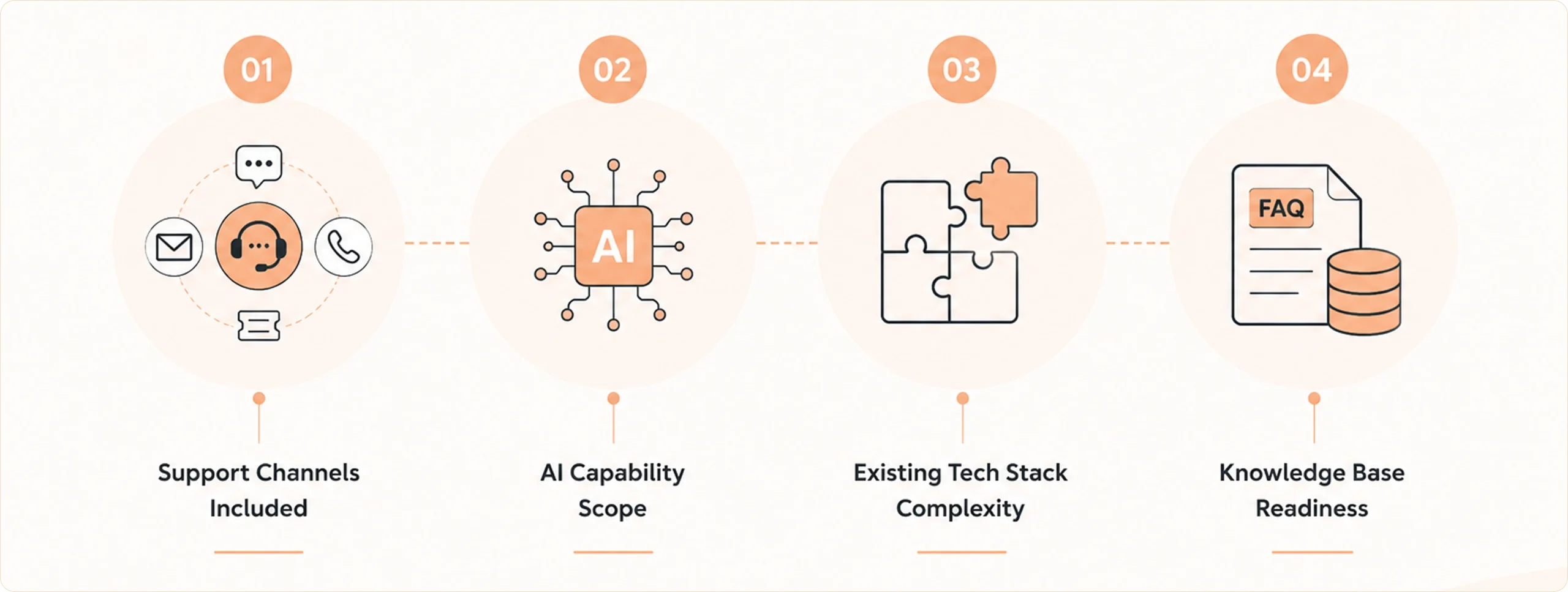
Factors that Affect the Implementation Cost of AI Customer Support

1. Support Channels Included

Every support channel increases implementation complexity.

If your startup only needs AI chat support, setup remains simpler.

If you want omnichannel customer support where AI understands conversations across email, tickets, and calls, the architecture becomes more advanced.

This usually includes:

  • Shared customer context
  • Conversation history
  • Intent detection
  • Escalation management
  • Cross-channel ticket synchronization

2. AI Capability Scope

Not every AI support system works the same way.

Some startups deploy simple AI chatbots that answer predefined questions.

Others implement agentic AI customer support systems that can:

  • Understand customer intent
  • Trigger workflows
  • Update accounts
  • Process refunds
  • Route tickets
  • Draft emails
  • Escalate complex cases automatically

The broader the automation scope, the higher the implementation cost.

3. Existing Tech Stack Complexity

Your existing customer support ecosystem directly affects the integration effort.

Most software startups already use tools like CRM, ticketing platforms, billing systems, product analytics tools, knowledge bases, and communication platforms.

AI support systems need access to these platforms to provide accurate responses.

This integration work contributes heavily to the implementation cost.

4. Knowledge Base Readiness

AI customer support depends heavily on support documentation quality.

If your startup already has FAQs, help center articles, SOPs, product guides, and historical tickets, then AI implementation becomes faster.

If information is scattered across Slack messages, Google Docs, internal wikis, and agent memory, additional effort goes into organizing and structuring knowledge.

This affects:

  • AI accuracy
  • First contact resolution
  • Escalation rate
  • Customer satisfaction (CSAT)

Average Cost to Implement AI Customer Support for a Software Startup

The implementation cost varies depending on the startup stage and support maturity.

Startup Stage Monthly Support Tickets Typical AI Customer Support Scope Estimated Initial Implementation Cost Ongoing Monthly Cost
Early-stage SaaS Under 2,000 AI chatbot, FAQ automation, live chat $8K–$20K $1K–$5K
Growth-stage SaaS 2,000–10,000 Omnichannel support, ticket routing, and AI email support $20K–$75K $5K–$20K
Mid-market SaaS 10,000+ Workflow automation, AI agents, backend integrations, analytics $75K–$250K+ $20K–$100K+

These costs usually include:

  • Platform setup
  • AI configuration
  • Workflow creation
  • Integration work
  • Knowledge base indexing
  • Testing and optimization

Hidden AI Customer Support Costs Software Startups Often Overlook

Many software startups estimate only the platform subscription cost when planning AI customer support implementation. In reality, hidden operational and technical expenses can increase the total investment by 30–70% beyond the initial quoted price.

For growth-stage SaaS companies, these hidden costs often become the difference between a successful AI rollout and an expensive underperforming deployment.

Hidden Cost Factor Typical Cost Impact Why It Increases AI Customer Support Cost
CRM & API Integrations 25–40% of the total implementation budget Connecting AI with CRM, billing systems, helpdesk software, subscription tools, and internal databases requires API setup, workflow mapping, testing, and synchronization.
Knowledge Base Preparation 10–20% of implementation effort Support documentation often needs restructuring, cleanup, tagging, and optimization before AI can deliver accurate responses.
AI Usage & LLM Costs Can grow 2–5X at scale As ticket volume increases, costs rise due to token usage, workflow executions, voice AI, long conversations, and omnichannel interactions.
Human Oversight & QA 15–25% ongoing operational effort Teams continuously monitor AI accuracy, failed conversations, escalation quality, and workflow performance after deployment.
Omnichannel Support Expansion 20–35% higher implementation complexity Adding email, voice, tickets, in-app support, and messaging platforms increases routing logic, context synchronization, and infrastructure requirements.
Escalation Workflow Design 30%+ higher repeat ticket risk if poorly configured AI-to-human handoff workflows require sentiment detection, priority routing, conversation summaries, and context sharing to maintain CSAT.
Security & Compliance Requirements 15–30% additional implementation effort SOC 2, GDPR, HIPAA, encryption, audit logs, and role-based access controls increase deployment complexity for enterprise SaaS startups.
Ongoing AI Optimization 10–15 operational hours per week Teams regularly optimize prompts, workflows, knowledge quality, ticket routing, and automation performance to improve containment and CSAT.

Build vs Buy: What’s More Cost-Effective for Software Startups?

One of the biggest decisions software startups face is whether to build AI customer support internally or use an AI customer support platform.

At first glance, building internally may seem cheaper because APIs and LLMs are widely available in 2026. However, AI customer support involves much more than connecting a chatbot to a website.

A complete AI support system requires:

  • Workflow orchestration
  • Omnichannel support
  • CRM integrations
  • Ticket routing
  • Escalation management
  • Knowledge retrieval
  • Security controls
  • AI monitoring
  • Analytics

This significantly increases engineering and operational complexity over time.

Build vs Buy Comparison

Factor Build Internally Use an AI Customer Support Platform
Initial Deployment Speed Slower Faster
Engineering Dependency High Lower
Workflow Orchestration Custom development required Prebuilt capabilities
Omnichannel Support Complex setup Built-in
AI Governance Internal responsibility Platform-supported
Maintenance Effort Continuous Reduced
Scaling Support Operations Infrastructure-heavy Easier scaling
Security & Compliance Fully managed internally Often preconfigured
Operational Predictability Variable More structured

For most software startups, buying an AI customer support platform becomes more cost-effective than building and maintaining a complete orchestration ecosystem internally.

What to Look for in an AI Customer Support Software?

Not every AI customer support platform offers the same operational capabilities.

Some platforms focus only on chatbot conversations, while others provide full AI orchestration across customer support workflows.

Software startups should evaluate platforms based on scalability, workflow automation, integration readiness, and operational governance.

Key Capabilities to Evaluate:

Capability Why It Matters
Omnichannel Support Maintains customer context across chat, email, voice, and tickets
Workflow Automation Reduces manual ticket handling and repetitive support tasks
CRM & API Integrations Connects AI with customer accounts, billing, and support systems
Knowledge Engine Improves AI response accuracy using support documentation and historical tickets
Human-in-the-Loop Controls Allows approvals and agent intervention for sensitive actions
Ticket Routing & Escalation Improves SLA handling and escalation accuracy
Analytics & Monitoring Tracks CSAT, containment rate, escalation trends, and AI performance
Deterministic Workflow Engine Prevents uncontrolled AI decisions during operational tasks
Security & Compliance Supports SOC 2, GDPR, HIPAA, audit logging, and RBAC
Scalability Supports growing ticket volumes without major infrastructure changes

Why SaaS Startups are Choosing Azeon for AI Customer Support?

As support volume grows across chat, email, tickets, and onboarding workflows, teams need AI systems that can understand customer intent, automate actions, and reduce operational workload.

This is why many SaaS companies are choosing Azeon for AI customer support.

Azeon combines Agentic AI with workflow orchestration, which helps startups automate ticket handling, customer interactions, escalations, and support operations from one unified platform.

Unlike traditional chatbot platforms, Azeon works as an intelligence and action layer across existing CRM, helpdesk, and support systems – without requiring large migration projects.

With capabilities like:

  • Omnichannel support
  • AI-powered workflow automation
  • Shared customer memory
  • Intelligent ticket routing
  • Human-in-the-loop governance
  • Deterministic execution

Azeon helps software startups improve response speed, reduce repetitive support effort, and scale customer support operations more efficiently as ticket volume grows.

Ready to see how AI customer support can scale your SaaS operations without increasing support complexity? Connect with the Azeon team.

Experience AI Customer Support That
Resolves, Routes & Automates

Book a Demo

FAQs: Cost to Implement AI Customer Support for a Software Startup

What is the average cost to implement AI customer support for a software startup?

The cost of implementing AI customer support for a software startup typically ranges from $8,000 to $75,000+, depending on ticket volume, integrations, workflow complexity, and support channels. Enterprise-grade AI customer support systems with omnichannel workflows and automation can cost significantly more.

What factors affect AI customer support implementation cost?

AI customer support costs depend on several factors, including CRM integrations, workflow automation, omnichannel support, knowledge base quality, AI training, security requirements, and ticket volume. Complex support operations usually require higher implementation effort and ongoing optimization.

How long does it take to implement AI customer support?

Most software startups can implement AI customer support within 4–12 weeks, depending on integration complexity and workflow requirements. Larger deployments involving CRM systems, workflow orchestration, and omnichannel support may take longer.

Can AI customer support integrate with existing SaaS tools?

Yes. Modern AI customer support platforms integrate with existing CRM systems, helpdesk tools, billing platforms, ticketing software, and internal databases through APIs and workflow orchestration layers. This helps startups avoid large migration projects.

What is the difference between AI chatbots and agentic AI customer support?

Traditional AI chatbots mainly answer predefined or retrieval-based questions. Agentic AI customer support platforms can understand customer intent, automate workflows, execute actions, route tickets intelligently, and support human agents during complex customer interactions.

Glossary

1. AI (Artificial Intelligence): AI refers to computer systems that can understand information, generate responses, analyze patterns, and automate tasks that usually require human decision-making.

2. Agentic AI: Agentic AI refers to AI systems that can not only respond to customer queries but also take actions, execute workflows, trigger processes, and make operational decisions within defined rules.

3. Omnichannel Customer Support: Omnichannel customer support connects conversations across multiple channels, such as chat, email, voice, tickets, and messaging platforms, while maintaining customer context throughout the journey.

4. Workflow Automation: Workflow automation uses software and AI to automatically perform repetitive operational tasks such as ticket updates, refund processing, account changes, and support actions.

5. LLM (Large Language Model): An LLM is an advanced AI model trained on massive amounts of text data to understand language, generate responses, summarize conversations, and assist with customer interactions.

Questions about Azeon?

Connect with our team to explore use cases, workflows, and deployment possibilities.