

Skip to content

How AI Automation Reduces Repetitive Help Desk Tickets Without Replacing Existing Support Stack?

How AI Automation Reduces Repetitive Help Desk Tickets Without Replacing Existing Support Stack?

On average, about 3 out of every 10 help desk tickets are related to password resets.

Add order tracking, billing questions, account updates, subscription changes, and refund requests, and repetitive service requests consume a significant share of every support team’s workload.

These requests follow predictable workflows, making them ideal candidates for automation.

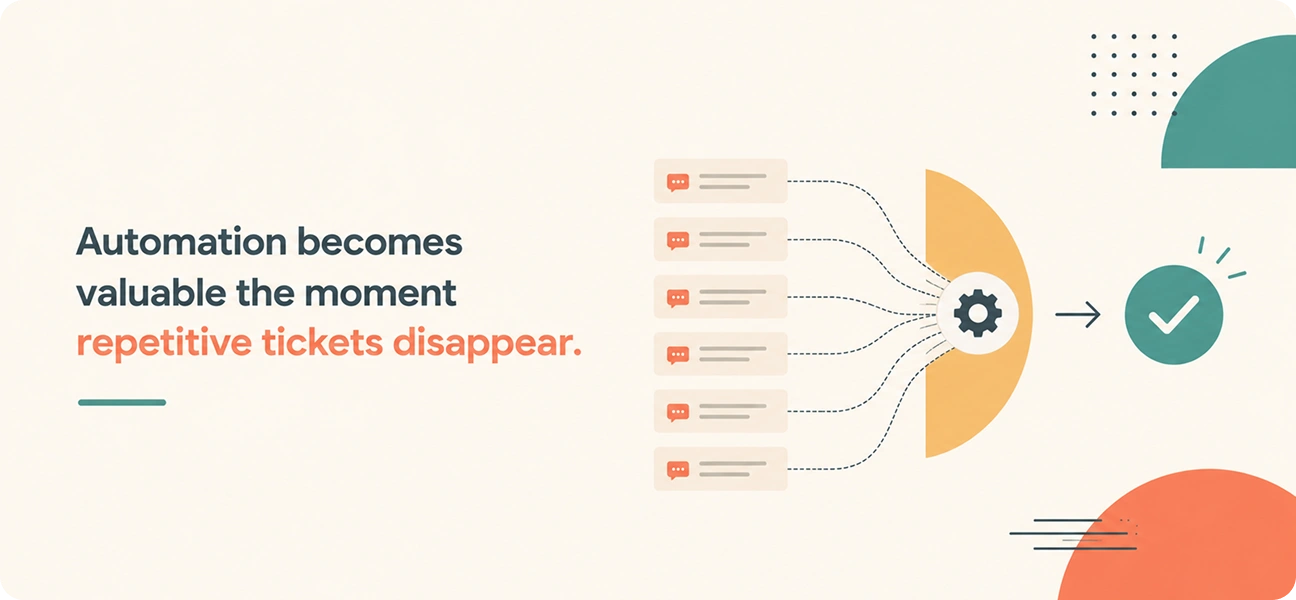
AI automation reduces repetitive help desk tickets by understanding customer intent, retrieving information from connected business systems, executing the required actions, and verifying that the request has been completed.

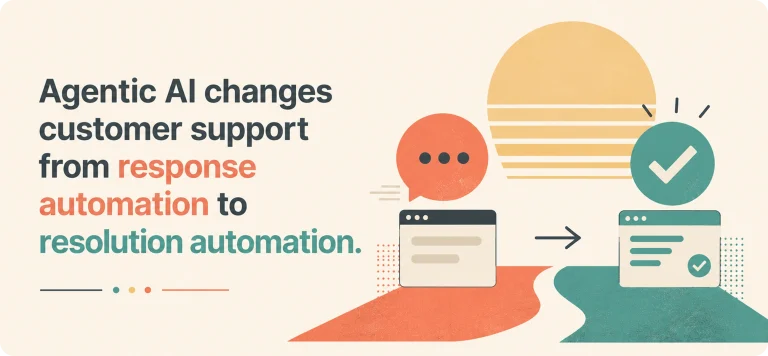
Instead of generating responses alone, modern AI (such as AI agents or Agentic AI) resolves the underlying issue that created the ticket.

This guide explains how AI automation reduces repetitive help desk tickets, the types of requests it can automate, the capabilities that improve resolution accuracy, and what to look for when evaluating an AI platform for enterprise customer support.


How AI Automation Reduces Repetitive Help Desk Tickets?

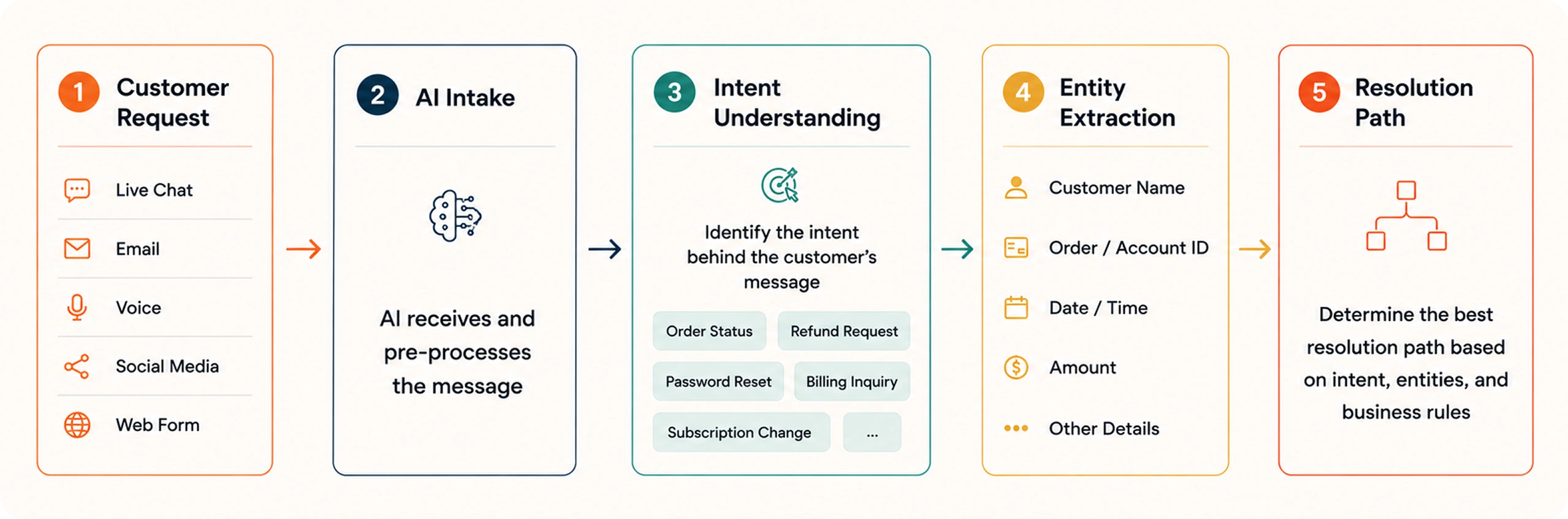
A typical AI-powered resolution follows these steps:

Step 1: Understand the Customer's Request

Every ticket begins with identifying what the customer wants. Modern AI analyzes the complete message rather than relying on keywords or predefined phrases.

Understand the Customer's Request

For example, these requests all represent the same intent:

  • “I forgot my password.”
  • “I can’t access my account.”
  • “Please help me log in.”
  • “Reset my login credentials.”

AI recognizes the intent regardless of how the customer phrases the request and determines the appropriate resolution path.

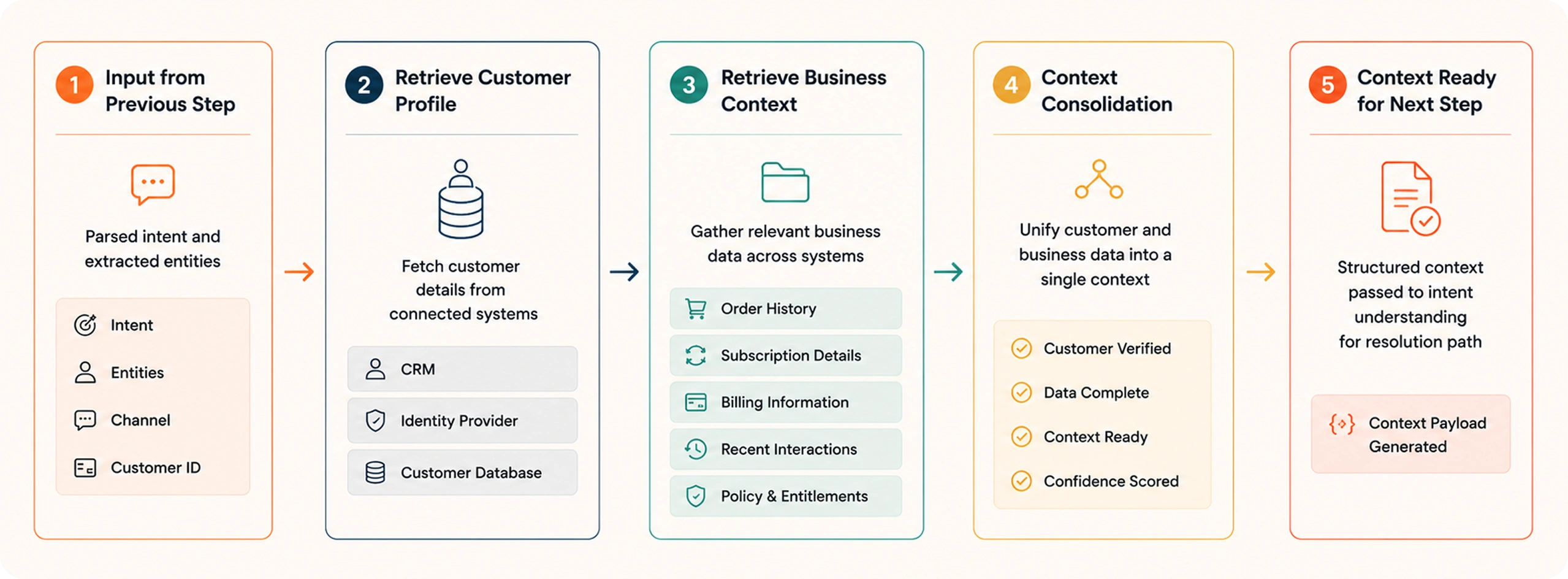
Step 2: Retrieve Customer and Business Context

Retrieve Customer and Business Context

Once the intent is identified, AI gathers the information needed to resolve the issue.

This may include:

  • Customer profile
  • Previous conversations
  • Account status
  • Knowledge base articles

Because AI retrieves context from connected business systems, customers don’t have to repeat information they’ve already provided.

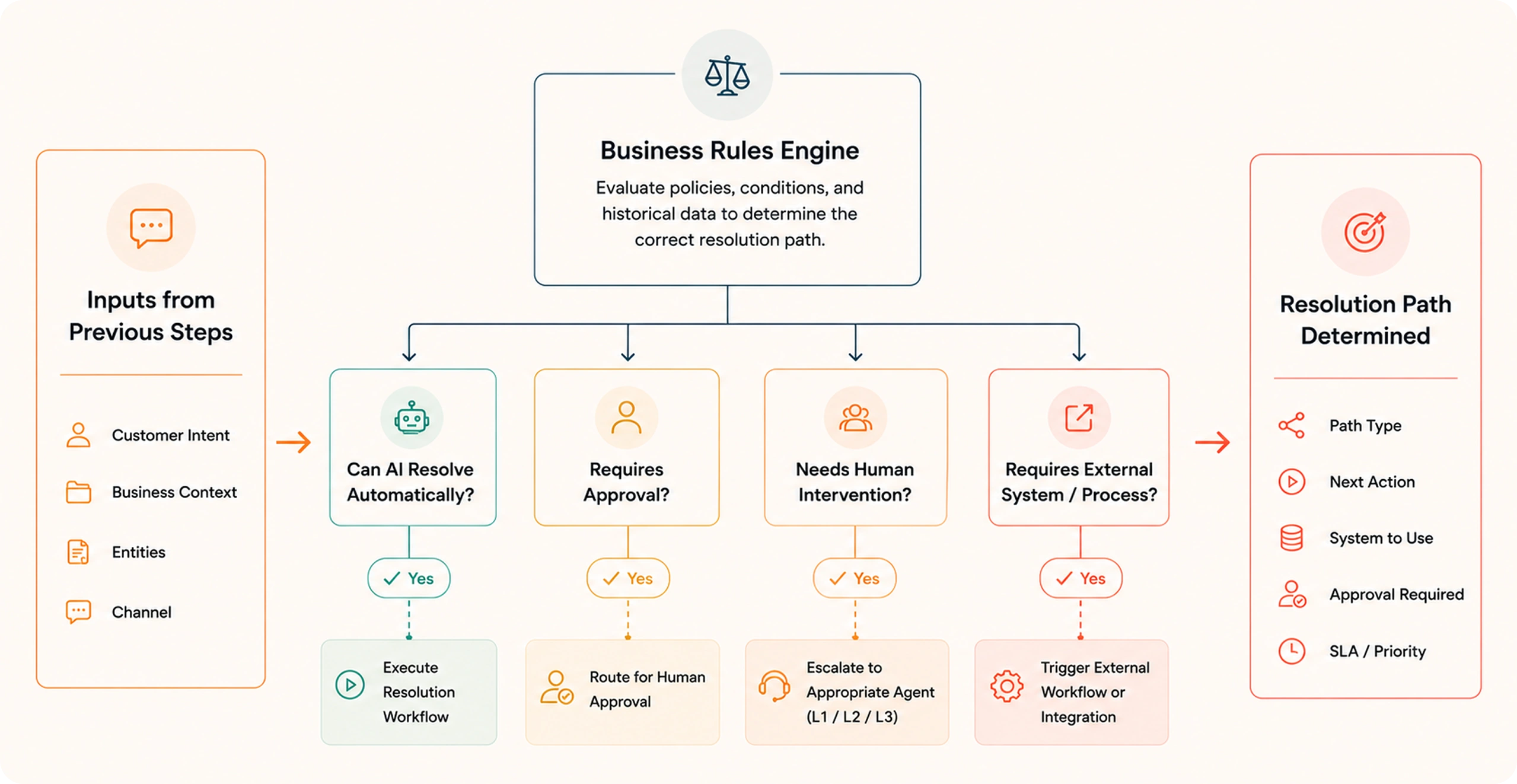
Step 3: Determine the Correct Resolution Path

Every request follows a different workflow depending on company policies and customer data.

You can see how it works in the below image.

Determine Correct Resolution Path

Instead of presenting generic answers, AI evaluates the available information and selects the correct action based on predefined business rules.

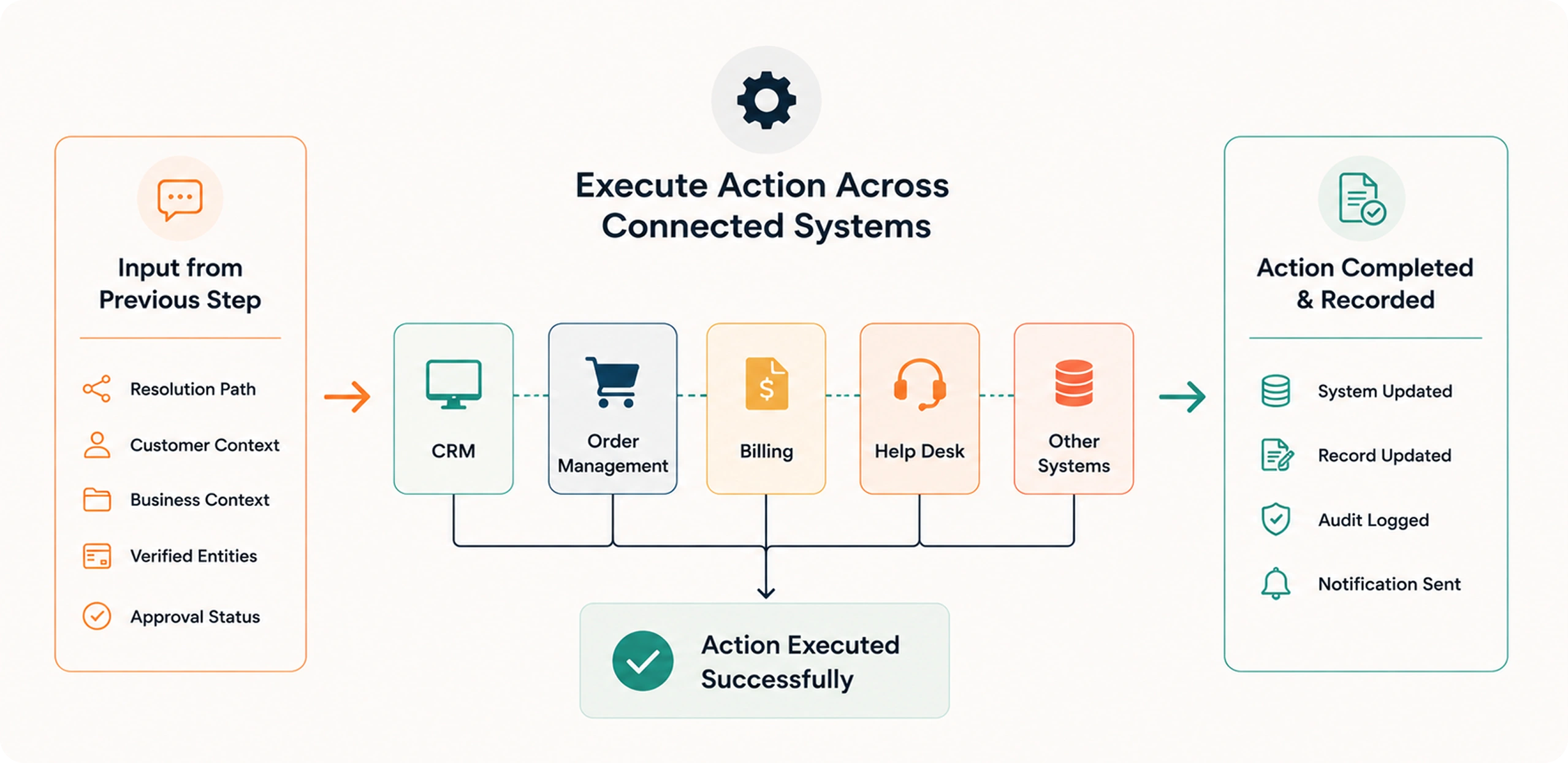
Step 4: Execute Actions Across Connected Systems

This is where AI automation reduces repetitive help desk tickets most effectively.

Rather than asking an agent to complete routine tasks manually, AI performs the required actions across integrated business applications.

The below image represent the same.

Execute Actions Across Connected Systems

Step 5: Verify Resolution Before Closing the Request

Completing an action isn’t enough. AI also confirms that the requested task has been successfully executed before marking the ticket as resolved.

For example:

  • Password reset completed successfully
  • Refund initiated
  • Subscription updated
  • Shipment information confirmed

This verification step improves resolution accuracy and reduces follow-up tickets.

Which Repetitive Help Desk Tickets Can AI Automate?

Many of the highest-volume tickets follow consistent workflows that AI can execute using connected business systems and predefined policies.

The more structured the process, the greater the opportunity for AI automation to reduce repetitive help desk tickets.

Help Desk Request Can AI Automate It? Typical Action
Password Reset Yes Verify identity and reset credentials
Order Status Yes Retrieve live shipment details
Delivery Updates Yes Fetch courier and tracking information
Refund Requests Yes Validate eligibility and initiate refund
Subscription Changes Yes Upgrade, downgrade, pause, or cancel plans
Billing Questions Yes Retrieve invoices and payment information
Address Updates Yes Update customer profile and order details
Product Availability Yes Check inventory across connected systems
Warranty Claims Yes Validate warranty and initiate claim workflow
Appointment Rescheduling Yes Check availability and update bookings

These requests are ideal candidates because they already follow established business processes. AI simply executes those processes consistently and at scale.

As organizations connect more systems to their AI platform, the range of repetitive help desk tickets that can be automated continues to grow. This allows support teams to focus their attention on complex customer issues that require investigation, judgment, or personalized assistance.

How AI Automation Works Without Replacing Your Existing Support Stack?

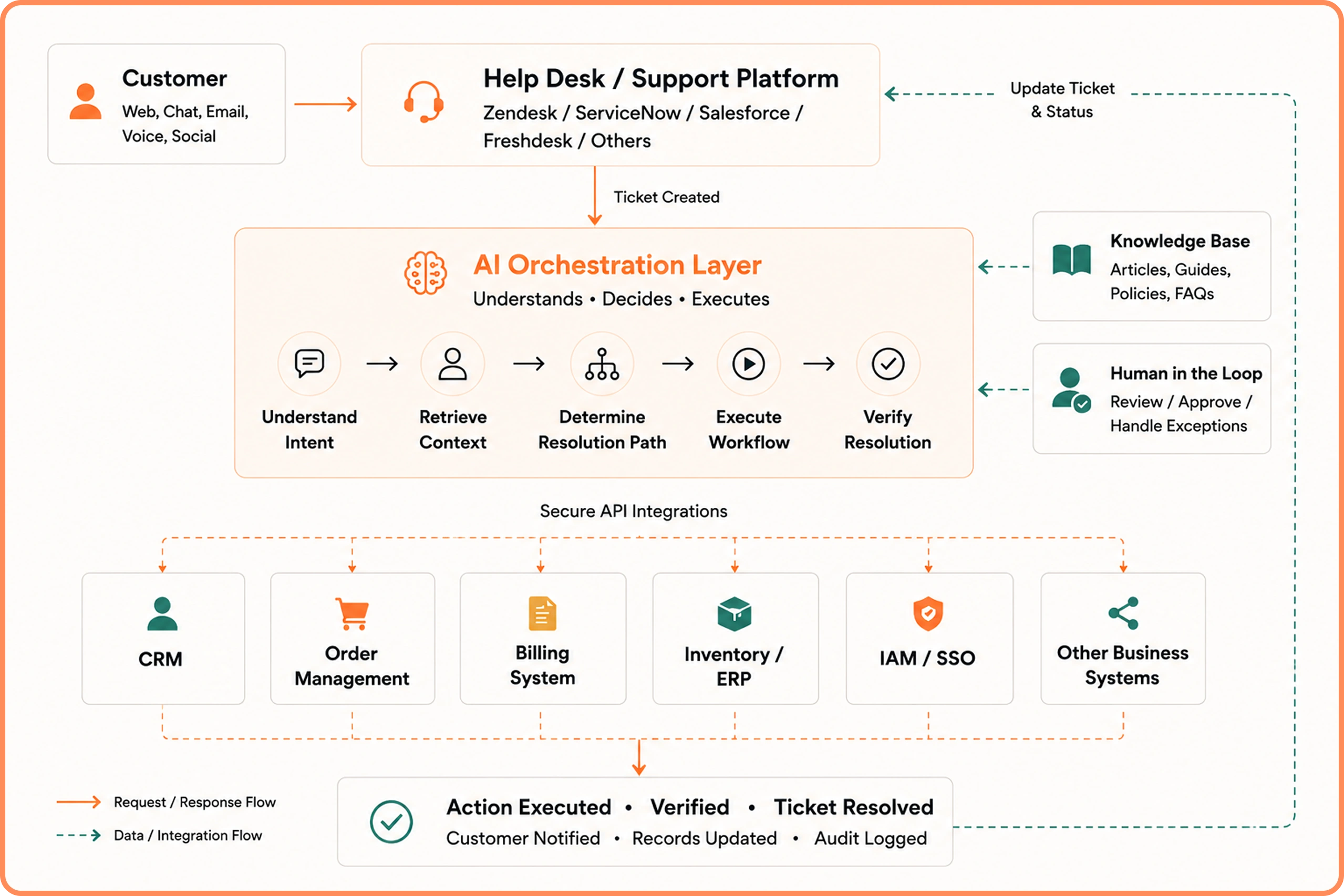
Reducing repetitive help desk tickets doesn’t require replacing your existing help desk platform. Instead, AI works as an orchestration layer that connects with the systems your support team already uses.

A typical enterprise support environment includes multiple applications, each responsible for a specific function. AI automation connects to these systems through APIs and uses them to complete support requests.

The diagram illustrates how AI automation reduces repetitive help desk tickets without replacing your existing support platform.

AI Automation Architecture that Works with Existing Support Stack

Customer requests continue to enter through your current help desk. The AI orchestration layer analyzes the request, retrieves the required context from connected business systems, determines the appropriate resolution path, and executes the necessary workflow. Once the action is completed, it updates the ticket, records the outcome, and notifies the customer.

Throughout this process, your existing help desk remains the system where tickets are created and tracked. AI simply coordinates the actions required to resolve the request.

The advantage of this architecture is that every business system continues to perform the role it was designed for. AI doesn’t replace your CRM, ERP, help desk, or billing platform. It coordinates them to complete repetitive support workflows automatically.

As organizations connect more business applications, AI gains access to additional workflows, enabling it to automate a broader range of repetitive help desk tickets without changing the existing technology stack.

Capabilities That Make AI Automation Effective at Reducing Repetitive Help Desk Tickets

Automating repetitive tickets requires more than a conversational interface. AI needs the capabilities to understand requests, make informed decisions, execute workflows, and maintain consistency across every interaction.

Shared Customer Context

AI retrieves information from support history, account records, purchases, subscriptions, and previous resolutions to understand the complete context before taking action.

This reduces repetitive questions, shortens resolution times, and improves the overall customer experience.

Business System Integrations

AI automation reduces repetitive help desk tickets by working across the systems that support teams already use every day.

Access to connected systems enables AI to complete operational tasks instead of simply providing information.

Workflow Execution

Many repetitive tickets involve multiple actions rather than a single response.

For example, processing a subscription downgrade may require AI to:

  • Validate the customer’s subscription
  • Apply business rules
  • Update the billing platform
  • Modify the CRM
  • Record the activity
  • Notify the customer

Executing the entire workflow eliminates manual intervention while maintaining consistency across every request.

Deterministic Decision Logic

AI should apply the same business rules every time a customer requests a refund, updates an account, or changes a subscription.

Deterministic decision logic allows organizations to define approval rules, eligibility requirements, operational policies, and escalation criteria so every automated action follows established business processes.

Human Approvals for Sensitive Requests

Some requests require additional review before an action is performed.

Examples include:

  • High-value refunds
  • Financial account changes
  • Sensitive customer information
  • Policy exceptions

In these situations, AI prepares the request, gathers the required information, and routes it to the appropriate team member for approval before continuing the workflow.

This balance between automation and oversight helps organizations automate repetitive work while maintaining operational control.

Auditability and Governance

Enterprise support teams need visibility into every automated decision.

AI should record:

  • Customer requests
  • Retrieved information
  • Actions performed
  • Workflow steps
  • System updates
  • Resolution outcomes

Comprehensive audit trails simplify compliance, improve transparency, and make it easier to review automated decisions whenever required.

Business Outcomes of AI Automation That Reduces Repetitive Help Desk Tickets

The impact of AI automation extends beyond reducing ticket volume. Automating repetitive requests improves several operational metrics that support leaders already track.

  • First Contact Resolution: More requests resolved during the initial interaction
  • Resolution Time: Routine requests completed in minutes instead of waiting in queues
  • Cost per Resolution: Less manual effort required for common support requests
  • Agent Productivity: Teams spend more time handling complex customer issues
  • Ticket Backlog: Lower volume of repetitive requests reaching support agents
  • Customer Satisfaction: Faster and more consistent resolutions
  • Operational Scalability: Support capacity grows without increasing headcount

These improvements become more significant as ticket volumes increase.

The result is a support operation that scales more efficiently while maintaining consistent service quality.

Ready to Automate Repetitive Help Desk Tickets? Meet Azeon

Azeon is a resolution-first AI agent for customer support platform that helps enterprises automate and resolve repetitive help desk tickets across chat, email, voice, and other support channels.

Designed to work with your existing support ecosystem, Azeon integrates with your help desk, CRM, and business applications, allowing you to introduce AI without replacing the tools your teams already use.

Key capabilities of Azeon includes:

  • Understands customer intent using advanced AI reasoning
  • Maintains shared customer context across every interaction
  • Executes workflows across connected business systems
  • Integrates with existing help desk, CRM, ERP, and knowledge platforms
  • Supports chat, email, voice, and other customer support channels
  • Applies deterministic business rules for consistent decision-making
  • Includes human approval workflows for sensitive requests

Most AI support tools assist agents by generating responses. Azeon goes further by completing the work behind the request.

That means faster resolutions, lower support costs, higher first-contact resolution, and more time for your support teams to focus on complex customer issues.

Schedule a personalized demo with Azeon to see how agentic AI can integrate with your support environment, automate routine workflows, and deliver faster resolutions at enterprise scale.

See Azeon in Action. Book Your Personalized Demo.

Explore how Azeon's agentic AI resolves routine support requests, connects with your business systems, and helps your team focus on higher-value customer interactions.

Book a Live Demo →

FAQs

How does AI automation reduce repetitive help desk tickets?

AI automation reduces repetitive help desk tickets by understanding customer requests, retrieving relevant business data, and executing the required actions automatically. Instead of simply suggesting responses, modern AI can reset passwords, process refunds, update accounts, check order statuses, and complete other routine workflows. This reduces manual effort and allows support teams to focus on more complex customer issues.

What types of help desk tickets can AI automate?

AI can automate many high-volume support requests, including password resets, order tracking, refund requests, billing inquiries, subscription changes, address updates, invoice generation, warranty claims, and appointment scheduling. These requests follow structured workflows, making them well suited for AI-powered resolution.

Can AI automate help desk tickets without human intervention?

Yes, AI can fully automate many routine help desk tickets when the required workflows and business rules are clearly defined. For requests involving approvals, policy exceptions, or sensitive customer information, AI can involve human agents at the appropriate stage before completing the resolution.

What are the benefits of AI automation for help desk teams?

AI automation helps reduce repetitive help desk tickets, improve first-contact resolution, shorten resolution times, lower support costs, and reduce ticket backlogs. It also allows support agents to spend more time resolving complex customer issues instead of handling routine operational tasks.

Why should businesses choose Azeon for AI-powered help desk automation?

Azeon helps organizations automate repetitive help desk tickets by combining AI reasoning, workflow execution, shared customer context, and enterprise integrations. Instead of generating responses alone, Azeon completes the operational tasks required to resolve customer requests while working seamlessly with your existing support stack.

David works closely with enterprise organizations to help them modernize customer support operations through AI-driven automation. With experience in strategic account management, customer engagement, and technology consulting, David focuses on aligning business objectives with scalable support solutions that improve efficiency, customer experience, and operational performance.

David Pridgen
Solution Consultant

Questions about Azeon?

Connect with our team to explore use cases, workflows, and deployment possibilities.