Skip to content

10 Best Platforms for Implementing AI in Customer Support [2026 Guide]

10 Best Platforms for Implementing AI in Customer Support [2026 Guide]

Start searching for the best platform for implementing AI in customer support, and you’ll quickly run into the same problem.

Every vendor promises faster resolutions. Every platform claims intelligent automation. Every website talks about AI agents, omnichannel experiences, workflow automation, and customer satisfaction improvements.

Within minutes, you’re comparing dozens of solutions that appear remarkably similar on the surface.

The challenge isn’t finding an AI customer support platform.

The challenge is determining which platform can actually deliver the outcomes your organization is pursuing.

That’s why we’ve created this guide.

We analyzed the best solutions for implementing AI in customer support based on automation capabilities, omnichannel support, integrations, analytics, governance, scalability, and overall business value.

Whether you’re evaluating AI for the first time or replacing an existing solution, this comparison will help you understand where each platform excels, where it falls short, and which option deserves a place on your shortlist.
Criteria We Used to Choose the Best Platforms for Implementing AI in Customer Support

Not every AI customer support platform delivers the same level of value. Some focus primarily on chat automation, while others function as intelligent orchestration layers capable of executing actions across multiple systems.

Here are the criteria we used to evaluate each platform.

AI Automation Capabilities

We assessed how effectively each platform can automate customer interactions, execute workflows, resolve issues autonomously, and assist agents during complex conversations.

Omnichannel Support

Support today happens across multiple channels. We evaluated each platform’s ability to operate across chat, email, voice, messaging apps, and ticketing systems.

Integration Ecosystem

The best customer support AI platforms integrate seamlessly with CRMs, help desks, ERPs, billing platforms, payment gateways, and internal business applications.

Knowledge Management

AI performance depends heavily on knowledge accessibility. We reviewed each platform’s ability to connect knowledge bases, documentation, historical tickets, and customer records.

Analytics and Reporting

Organizations need visibility into AI performance, customer trends, escalation patterns, and operational bottlenecks.

Security and Compliance

Enterprise buyers require strong governance controls, auditability, role-based access, encryption, and compliance support.

Scalability and Pricing

We considered deployment flexibility, enterprise readiness, and overall pricing transparency.

10 Best Platforms for Implementing AI in Customer Support

Platform Best For Omnichannel Support Workflow Automation Enterprise Readiness
Azeon Agentic AI customer support Yes Advanced High
Intercom Fin SaaS companies Yes Moderate Medium
Zendesk AI Zendesk users Yes Moderate High
Salesforce Einstein for Service Large enterprises using Salesforce Yes Advanced High
Freshworks Freddy AI Growing support teams Yes Moderate Medium
Ada Customer self-service automation Yes Moderate Medium
Forethought Ticket deflection and agent assistance Yes Moderate Medium
Kore.ai Enterprise conversational AI Yes Advanced High
IBM watsonx Assistant Regulated industries Yes Advanced High
Microsoft Dynamics 365 Customer Service Microsoft-centric organizations Yes Advanced High

1. Azeon

Best for: Organizations seeking an agentic AI customer support platform capable of automating customer interactions and operational workflows across chat, email, voice, and ticketing channels.

Overview:

Azeon is an Agentic AI-powered customer support solution. Instead of simply answering questions, it can understand customer intent, retrieve context, execute actions, and coordinate workflows across enterprise systems. The platform operates as an intelligence layer on top of existing customer support infrastructure without requiring organizations to replace their current CRM or helpdesk environment.

One of Azeon’s strongest differentiators is its deterministic execution model. While large language models assist with understanding and communication, business decisions and workflow execution remain governed through controlled logic and enterprise rules. This provides stronger auditability and governance for enterprise environments.

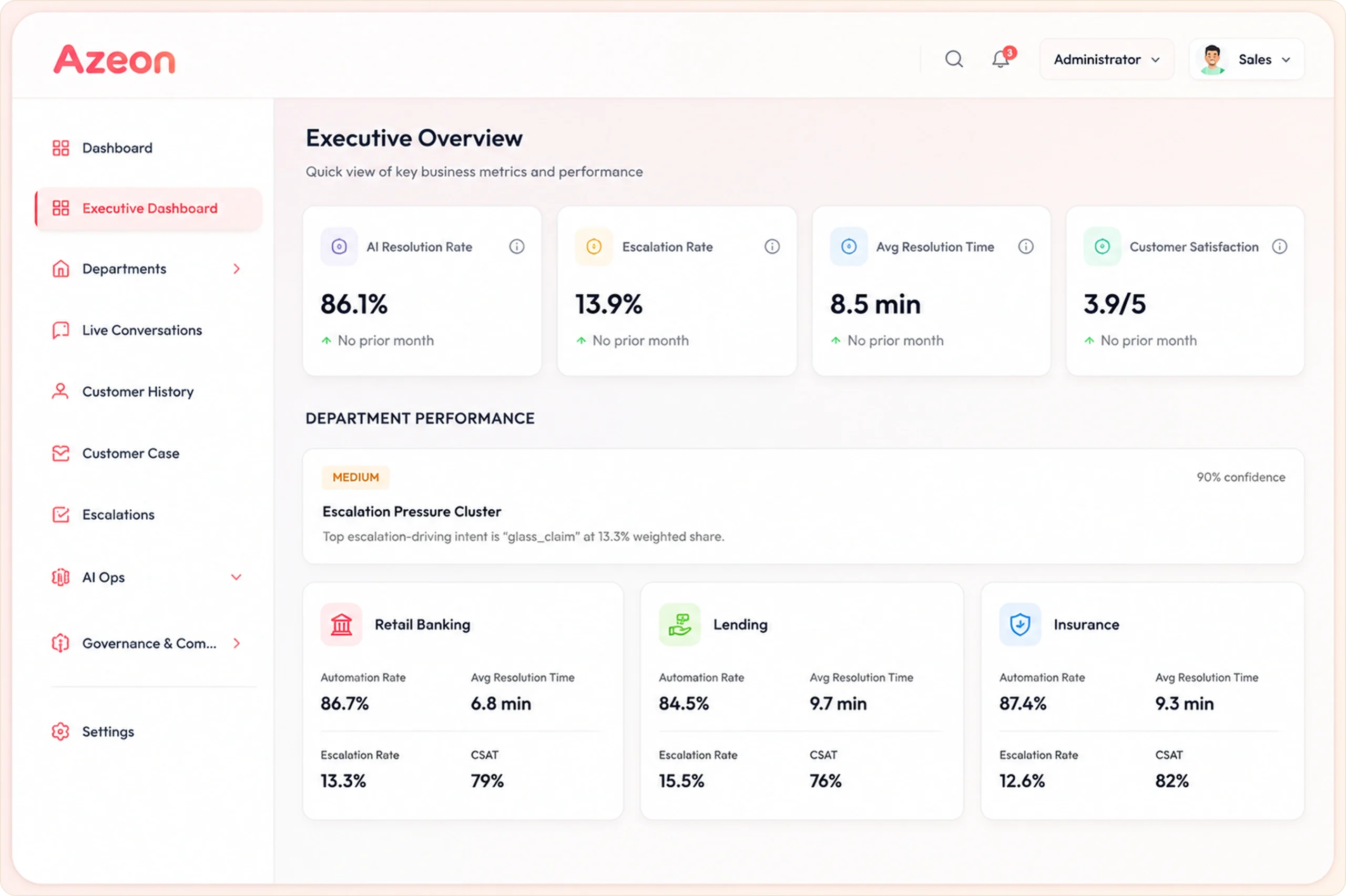
Azeon Executive Dashboard

Key Features:

  • Omnichannel Support: Unifies chat, email, voice, and ticket-based interactions to deliver consistent customer experiences across every channel.
  • Smart Knowledge Engine: Indexes documentation, FAQs, policies, and historical tickets to surface relevant answers instantly.
  • Unified Customer Memory: Maintains a complete customer history across channels, ensuring every interaction starts with full context.
  • Real-Time Command Center: Provides a centralized view of conversations, AI performance, operational metrics, and support activity.
  • Live Conversation Monitoring: Allows managers to monitor active interactions, review performance, and intervene when needed.
  • Human-in-the-Loop Controls: Supports approval workflows for sensitive actions such as refunds, account changes, and compliance-related requests.
  • Context-Aware Escalations: Transfers conversation history, customer context, and recommended actions during human handoffs.
  • AI Operations & Review Queue: Enables teams to review AI decisions, monitor automation quality, and continuously optimize performance.
  • Root Cause Analytics: Identifies recurring issues, customer friction points, and operational bottlenecks that drive support volume.
  • Performance Intelligence: Tracks key metrics such as resolution rates, FCR, AI confidence scores, and support efficiency.
  • Audit Logs & Governance: Records every action and decision to provide transparency, traceability, and enterprise oversight.
  • Enterprise Security: Supports SOC 2, ISO 27001, GDPR, HIPAA, RBAC, encryption, and audit trail requirements.
  • Extensive Integrations: Connects with CRMs, ERPs, help desks, payment platforms, and custom business applications.
  • Executive Dashboards: Delivers actionable insights into customer experience performance, automation effectiveness, and operational outcomes.
| Proven Results from Live Environments |

Measured Outcomes Across Production Deployments

Metric
Outcome
CSAT improvement (Retail case study)
3.7 → 4.8
Reduction in repeat contact rate
35%
Reduction in Average Handle Time (Logistics)
32%
Common queries resolved annually
250,000+
Ticket automation without SLA risk (SaaS)
96%
Customer Lifetime Value improvement
2X
Goal Completion Rate (GCR)
95%+
Semantic Accuracy
>92%
Guardrail Adherence
99.999%
Annual OpEx Reduction
Up to $250K

Pros:

  • No migration required
  • Strong omnichannel orchestration
  • Enterprise governance controls
  • Deterministic execution model
  • Outcome-based pricing
  • Extensive workflow automation
  • Human oversight capabilities
  • Enterprise compliance support

Cons:

  • Enterprise-focused capabilities may exceed the requirements of very small teams
  • Advanced deployments may require discovery and implementation planning

Pricing:

Azeon’s pricing model is called Result-as-a-Service – you pay per successfully resolved ticket, not per seat, per agent, per token, or per action.

While every other AI tools for customer support in this guide bills you for consumption, Azeon bills you for outcomes.

Pricing of Azeon

David Pridgen
David Pridgen
National Account Manager

Evaluate Azeon Against Your Current Customer Support Stack

Discover how Azeon works alongside your existing CRM, help desk, and business systems.

Book a Personalized Demo →

2. Intercom Fin

Best for: SaaS companies, digital-first businesses, and support teams looking to deploy an AI customer service agent quickly without extensive implementation effort.

Overview:

Intercom Fin is an AI customer service agent built on top of Intercom’s customer service platform. The solution is designed to resolve customer questions across chat, email, phone, and other support channels while leveraging company knowledge bases and support content. Fin can also be deployed on external help desks, allowing organizations to use its AI capabilities without migrating their existing support stack.

The platform focuses heavily on automated resolution, conversational support, workflow execution, and self-service experiences. Intercom positions Fin as a customer-facing AI agent that can answer questions, complete procedures, and resolve customer issues while continuously improving through interaction data. The company highlights strong self-service outcomes and reduced support workloads for customer service teams.

Key Features:

  • AI customer agent for support, sales, and ecommerce
  • Supports chat, email, phone, and messaging channels
  • Can be deployed with existing help desks
  • Workflow automation and procedure execution
  • Customizable tone and response style
  • Knowledge base integration
  • Shared inbox and ticketing system
  • Multilingual support capabilities
  • AI-powered resolution workflows
  • Help center integration
  • Automated customer issue resolution
  • Outcome-based AI performance measurement

Pros:

  • Quick deployment process
  • Works with existing help desk systems
  • Strong SaaS ecosystem adoption
  • Supports multiple communication channels
  • Outcome-based AI pricing model
  • Good fit for growing support teams
  • Built-in help center and ticketing capabilities

Cons:

  • Advanced capabilities may require higher-tier plans
  • Best experience often comes within the Intercom ecosystem
  • Enterprise governance capabilities are less prominent than some enterprise-focused competitors
  • Pricing can increase with growing resolution volumes

Pricing:

Fin AI Agent

  • $0.99 per outcome
  • No seat requirement when used with external help desks
  • Minimum monthly commitment applies

Intercom + Fin Plans

  • Essential: $29/seat/month + $0.99 per outcome
  • Advanced: $85/seat/month + $0.99 per outcome
  • Expert: $132/seat/month + $0.99 per outcome

3. Zendesk AI

Best for: Organizations already using Zendesk that want AI-driven automation, agent assistance, and customer service optimization within a mature support ecosystem.

Overview:

Zendesk AI serves as the intelligence layer behind the Zendesk Resolution Platform. The company positions its AI capabilities around improving resolution outcomes through AI agents, knowledge management, agent copilots, and quality assurance systems. Zendesk emphasizes continuous improvement through its Resolution Learning Loop, where each customer interaction contributes to future AI performance improvements.

A major strength of Zendesk AI is its ability to combine AI automation with existing service workflows. AI agents can operate across messaging, email, voice, and customer service channels while accessing business systems, knowledge repositories, and customer context. Zendesk claims its AI agents can automate over 80% of customer interactions while maintaining governance and quality controls.

Key Features:

  • AI agents for autonomous customer support
  • Resolution Learning Loop
  • AI-powered knowledge graph
  • Automated content optimization
  • Agent copilot assistance
  • Multi-channel support
  • Voice, messaging, and email automation
  • AI-powered workflow execution
  • Knowledge gap detection
  • Real-time quality assurance monitoring
  • AI-powered customer service analytics
  • Built-in governance controls

Pros:

  • Mature customer service ecosystem
  • Strong AI agent capabilities
  • Excellent knowledge management framework
  • Enterprise-ready architecture
  • Continuous AI improvement model
  • Strong omnichannel capabilities
  • Large partner ecosystem

Cons:

  • Can become expensive at scale
  • Most valuable for existing Zendesk users
  • Advanced functionality often requires additional products
  • Implementation complexity can increase for large enterprises

Pricing:

Zendesk offers AI capabilities through its customer service plans and AI add-ons. Pricing varies by service tier and AI deployment requirements. Custom enterprise pricing is available.

4. Salesforce Einstein for Service

Best for: Large enterprises operating within Salesforce environments that need AI-powered customer service, workflow automation, and CRM-driven support experiences.

Overview:

Salesforce Einstein for Service combines predictive AI, generative AI, and Agentforce capabilities within the Salesforce ecosystem. The platform focuses on helping service teams automate case handling, improve agent productivity, personalize customer experiences, and leverage customer data across the Customer 360 platform.

One of Salesforce’s strongest differentiators is its integration with CRM data. Einstein can surface relevant information during support interactions, generate summaries, automate workflows, classify cases, recommend knowledge articles, and provide next-best-action guidance. The platform is particularly attractive for enterprises already invested in Salesforce infrastructure.

Key Features:

  • Agentforce AI agents
  • Einstein Bots
  • Case classification
  • Intelligent case routing
  • Knowledge recommendations
  • Conversation summarization
  • Customer 360 integration
  • Predictive AI capabilities
  • Generative AI assistance
  • Einstein Trust Layer
  • Automated workflow execution
  • Omnichannel routing
  • Self-service portals
  • Service Cloud Voice integration

Pros:

  • Deep Salesforce integration
  • Enterprise-grade scalability
  • Strong AI governance controls
  • Extensive CRM intelligence
  • Comprehensive ecosystem
  • Advanced automation capabilities
  • Robust compliance and security features

Cons:

  • Higher total cost of ownership
  • Steeper implementation requirements
  • Best suited for Salesforce customers
  • Significant administrative complexity

Pricing:

  • Starter Suite: $25/user/month
  • Pro Suite: $100/user/month
  • Enterprise: $175/user/month
  • Unlimited: $350/user/month
  • Agentforce 1 Service: $550/user/month

5. Freshworks Freddy AI

Best for: Growing support teams seeking fast AI adoption with minimal complexity.

Overview:

Freddy AI is Freshworks’ AI platform designed to automate customer support workflows, improve agent productivity, and provide operational insights. The platform focuses on reducing repetitive work through AI agents, AI copilots, and AI-powered analytics.

Freshworks positions Freddy as a practical AI solution that can be deployed quickly without extensive technical effort. The platform includes pre-built workflows and automation capabilities that allow organizations to launch AI support experiences rapidly while maintaining visibility into performance and service quality.

Key Features:

  • Automated customer support
  • Email automation
  • Messaging automation
  • Ticket resolution assistance
  • AI-generated responses
  • Workflow automation
  • Service performance analytics
  • Operational insights
  • Resolution recommendations
  • Pre-built agentic workflows

Pros:

  • Fast deployment
  • User-friendly interface
  • Strong SMB and mid-market fit
  • Pre-built workflows
  • Good balance of automation and usability
  • Lower complexity than enterprise-heavy platforms

Cons:

  • Enterprise customization may be limited
  • Governance capabilities are less extensive than some competitors
  • Advanced orchestration may require additional configuration
  • Best value often comes within Freshworks ecosystem

Pricing:

Freddy AI pricing varies by Freshdesk and Freshworks plan. Custom pricing and demo-based pricing are available through Freshworks sales.

6. Ada

Best for: Organizations focused on self-service automation and AI-driven customer resolution across digital channels.

Overview:

Ada is an enterprise AI customer service platform designed to automate customer inquiries across chat, voice, and email. The company states its AI agents can resolve up to 83% of customer inquiries while supporting over 50 languages.

A major differentiator for Ada is its coaching and playbook framework. Organizations can train AI agents using standard operating procedures, monitor reasoning, test changes before deployment, and continuously improve AI performance through feedback and analytics.

Key Features:

  • AI customer service agents
  • Playbooks for SOP execution
  • AI coaching framework
  • Resolution analytics
  • Voice automation
  • Email automation
  • Chat automation
  • Real-time KPI dashboards
  • AI testing environment
  • Customer segmentation
  • PII protection controls

Pros:

  • Strong self-service automation
  • Excellent multilingual support
  • Robust coaching framework
  • Enterprise-grade controls
  • Flexible AI training capabilities
  • Strong analytics capabilities

Cons:

  • Pricing not publicly disclosed
  • May require operational maturity for optimization
  • Advanced workflows require planning
  • Enterprise focus may exceed SMB needs

Pricing:

Ada does not publicly publish standard pricing. Industry estimates suggest, entry-level enterprise deployments: ~$30,000–40,000/year, mid-market deployments: ~$70,000+/year, and large enterprise environments: $100,000–300,000+/year depending on ticket volume, automation scope, and integrations.

7. Forethought

Best for: Enterprise support teams looking for a dedicated AI customer support platform focused on autonomous resolution, ticket deflection, agent productivity, and AI-driven customer experience optimization.

Overview:

Forethought positions itself as an AI-first customer support platform built specifically for customer service operations. Unlike traditional chatbot vendors, Forethought uses a multi-agent architecture where specialized AI agents collaborate across the customer journey to identify issues, classify tickets, resolve inquiries, and support human agents.

The platform emphasizes end-to-end resolution through agentic AI. Forethought’s AI agents can reason, make decisions, and take action based on business policies and customer context. The company reports strong customer outcomes, including an average 15x ROI, 55% reduction in first response time, and resolution rates reaching up to 98% in certain deployments.

Key Features:

  • Solve Agent for autonomous resolution
  • Triage Agent for intelligent ticket classification
  • QA Agent for quality monitoring
  • Discover Agent for support insights
  • Omnichannel AI support
  • AI-powered ticket routing
  • Agentic AI Copilot
  • Knowledge gap identification
  • AI workflow optimization
  • Customer intent recognition

Pros:

  • Purpose-built for customer support
  • Strong ticket deflection capabilities
  • Multi-agent architecture provides specialized automation
  • Learns from historical tickets and help center content
  • Strong ROI and productivity metrics
  • Omnichannel support capabilities

Cons:

  • Pricing is not publicly available
  • Enterprise deployments may require implementation planning
  • More focused on support operations than broader CRM workflows
  • Smaller ecosystem compared to Salesforce or Microsoft

Pricing:

Forethought uses custom enterprise pricing. Market estimates indicate, team plans starts around $239/month in some configurations and enterprise deployments: ~$40,000–155,000+/year.

8. Kore.ai

Best for: Large enterprises seeking conversational AI, contact center automation, and AI-powered customer service at scale.

Overview:

Kore.ai offers an enterprise-grade AI for Service platform that combines customer self-service, agent assistance, and contact center automation within a unified environment. The platform is designed to improve customer experiences while reducing operational costs through intelligent automation and AI-driven service workflows.

One of Kore.ai’s major strengths is flexibility. Organizations can combine deterministic workflows for highly regulated processes with agentic AI capabilities for more natural customer conversations. This approach allows businesses to maintain governance controls while benefiting from advanced conversational AI.

Key Features:

  • Intelligent agent assistance
  • Omnichannel support experiences
  • Voice and digital channel automation
  • Unified agent desktop
  • Intelligent skill-based routing
  • Workflow automation
  • Customer self-service
  • Agent augmentation tools
  • Personalized customer engagement
  • Enterprise AI governance

Pros:

  • Enterprise-focused architecture
  • Strong contact center capabilities
  • Supports both deterministic and agentic AI approaches
  • Excellent omnichannel support
  • Flexible deployment options
  • Strong governance capabilities
  • Suitable for highly regulated industries

Cons:

  • Enterprise implementation can be complex
  • Learning curve for advanced capabilities
  • Pricing is not publicly disclosed
  • Smaller ecosystem compared to Salesforce or Microsoft

Pricing:

Kore.ai provides custom enterprise pricing.

9. IBM watsonx Assistant

Best for: Financial services, healthcare, insurance, government, and enterprises with strict security, governance, and compliance requirements.

Overview:

IBM watsonx Assistant is an enterprise conversational AI platform designed to help organizations automate customer interactions, improve self-service experiences, and support contact center operations. IBM combines conversational AI with enterprise integration capabilities, allowing businesses to deploy AI across customer-facing and agent-facing workflows.

The platform emphasizes enterprise readiness through strong governance, security controls, integration flexibility, and support for complex workflows. IBM also highlights the ability to connect AI agents with more than 80 enterprise applications while maintaining centralized authentication and security controls.

Key Features:

  • No-code AI agent builder
  • Omnichannel deployment
  • Voice automation
  • Contact center integration
  • Enterprise application integrations
  • Agent assistance capabilities
  • Human handoff workflows
  • Workflow orchestration
  • Multi-system automation

Pros:

  • Strong enterprise security
  • Extensive integration ecosystem
  • Flexible deployment options
  • Excellent for regulated industries
  • Supports voice and digital channels
  • Robust governance controls
  • No-code AI development capabilities

Cons:

  • Can require technical expertise
  • Enterprise deployments may have longer implementation cycles
  • Advanced functionality may increase costs
  • User experience can be less intuitive than some newer platforms

Pricing:

Offers Lite Plan, that is eligible up to 1,000 monthly active users and up to 10,000 messages per month. After that you have to opt for custom pricing.

10. Microsoft Dynamics 365 Customer Service

Best for: Organizations already invested in Microsoft technologies that want AI-powered customer service integrated with CRM and contact center operations.

Overview:

Microsoft Dynamics 365 Customer Service combines customer support management, CRM functionality, omnichannel engagement, and generative AI capabilities through Microsoft Copilot. The platform helps organizations streamline service operations while providing agents with AI-powered assistance and automation.

Microsoft’s approach centers on integrating AI directly into customer service workflows. Through Dynamics 365 and Copilot, organizations can automate repetitive tasks, improve self-service experiences, assist agents with recommendations, and manage customer interactions across multiple channels. The platform becomes particularly powerful for businesses already using Microsoft 365, Azure, Teams, and other Microsoft services.

Key Features:

  • Microsoft Copilot integration
  • AI-powered case management
  • Omnichannel customer engagement
  • Knowledge management
  • Intelligent routing
  • Self-service capabilities
  • Contact center integration
  • Customer service automation
  • AI-generated recommendations
  • Agent productivity tools

Pros:

  • Deep Microsoft ecosystem integration
  • Strong CRM and service capabilities
  • Enterprise-grade scalability
  • Generative AI functionality through Copilot
  • Robust security and compliance framework
  • Strong analytics and reporting
  • Suitable for complex service environments

Cons:

  • Best value comes within Microsoft ecosystem
  • Licensing can become expensive
  • Implementation complexity for large deployments
  • Advanced customization may require specialized expertise

Pricing:

Their pricing starts from $43/user/month. They also offer separate consumption-based pricing for AI agents and automation workloads.

How to Choose the Right Platform for Implementing AI in Customer Support

Evaluate Automation Capabilities

Look beyond basic chatbot functionality. The most effective platforms can understand customer intent, automate repetitive tasks, execute workflows, and resolve issues without human intervention. Strong automation capabilities often lead to lower support costs and faster resolutions.

Assess Omnichannel Support

Customers expect consistent experiences across chat, email, voice, messaging apps, and support portals. Choose a platform that maintains customer context across channels and enables seamless transitions between AI and human agents.

Review Integration Options

Your AI platform should work with the systems you already use, including CRMs, help desks, billing platforms, ERPs, and internal databases. Strong integrations help AI access the information needed to resolve customer issues efficiently.

Prioritize Security and Governance

For enterprise organizations, security and compliance are critical. Look for features such as role-based access controls, audit trails, human approval workflows, and support for compliance standards like SOC 2, GDPR, or HIPAA.

Compare Analytics and Reporting

A good platform should provide visibility into key performance metrics such as resolution rates, CSAT, ticket deflection, escalation trends, and agent productivity. These insights help measure ROI and identify opportunities for improvement.

Consider Pricing and Scalability

Compare pricing models carefully, whether they are seat-based, usage-based, or outcome-based. Also evaluate whether the platform can scale with your business as customer volumes, channels, and automation requirements grow.

Final Verdict

The market for AI customer support platforms continues to evolve rapidly, with vendors moving beyond simple chatbots toward autonomous customer service operations.

Organizations seeking conversational self-service may find strong value in solutions such as Intercom Fin, Ada, or Zendesk AI. Enterprises deeply invested in Salesforce or Microsoft ecosystems may benefit from native platform integrations.

However, Azeon emerges as one of the strongest options for organizations pursuing end-to-end customer support automation.

Its combination of agentic AI, deterministic workflow execution, omnichannel orchestration, enterprise governance, deep business system integrations, and outcome-based pricing creates a compelling proposition for organizations seeking measurable operational results.

For teams evaluating the best platform for implementing AI in customer support, Azeon offers a balanced combination of automation, visibility, scalability, and business impact.

Resolve More. Escalate Less. Scale Faster.

From chat and email to voice and tickets, Azeon helps automate resolutions, streamline workflows, and deliver consistent customer experiences across every touchpoint.

FAQs

What is the best platform for implementing AI in customer support?

The answer depends on your requirements. Organizations focused on enterprise automation often evaluate platforms like Azeon, Zendesk AI, Salesforce Einstein, and Intercom Fin. The best platform should align with your support channels, integrations, compliance requirements, and automation goals.

How much does AI customer support software cost?

Pricing varies widely. Some platforms charge per seat, while others use conversation-based, usage-based, or outcome-based pricing models. Enterprise deployments often involve custom pricing based on support volume and integrations. For more insights, read our blog on: Cost to Implement AI Customer Support for a Software Startup.

Can AI customer support platforms integrate with existing CRM systems?

Yes. Most leading platforms integrate with CRM systems, help desks, ERPs, payment platforms, and business applications. Integration capabilities should be evaluated carefully before implementation.

What features should businesses prioritize when selecting AI customer support software?

Key features include omnichannel support, workflow automation, knowledge management, analytics, governance controls, integrations, human handoff capabilities, and security compliance.

How long does AI customer support implementation take?

Implementation timelines vary based on complexity. Basic deployments can take days or weeks, while enterprise-wide implementations involving multiple systems may take several months.

Questions about Azeon?

Connect with our team to explore use cases, workflows, and deployment possibilities.