Skip to content

The Only Buyer Guide You Need for Customer Service Automation Software

The Only Buyer Guide You Need for Customer Service Automation Software

Buying customer service automation software requires a clear view of what you are actually purchasing.

Because some platforms automate ticket routing, tagging, summaries, and suggested replies.

Others use AI agents to handle customer conversations and complete actions across business systems.

Hence, the key question becomes: Can the software reduce the number of customer issues your team has to resolve manually?

That makes resolution capability, workflow execution, integrations, security, pricing, and ROI important buying criteria.

This buyer’s guide answers the questions support leaders, CX leaders, IT teams, and procurement teams should ask before selecting a solution.

P.S.: We also included the list of best customer service automation software in 2026.
What Should Customer Service Automation Software Actually Do?

The right software should handle meaningful parts of the support workflow, from understanding a request to completing the required action.

Use these questions to separate response automation from software that can drive an issue through to resolution.

Can Customer Service Automation Software Resolve Customer Issues Instead of Simply Answering Questions?

Yes, depending on the platform.

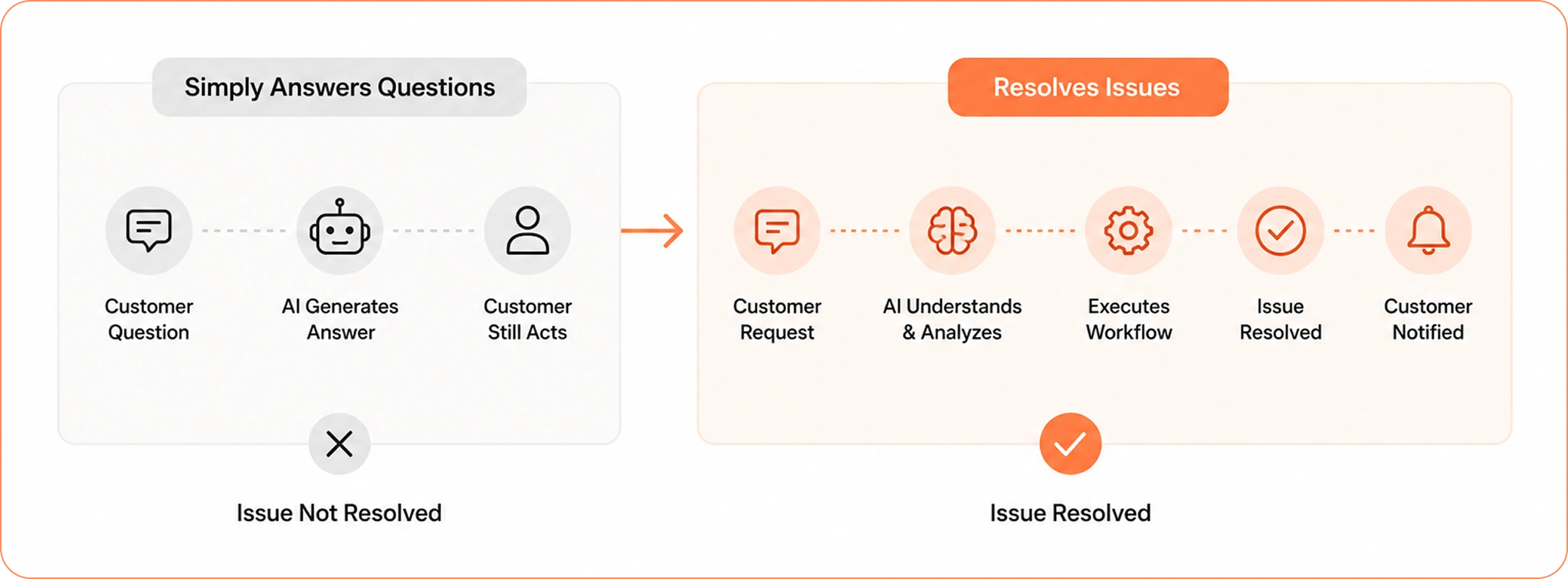
Answer automation provides information to the customer. Resolution automation completes the required action.

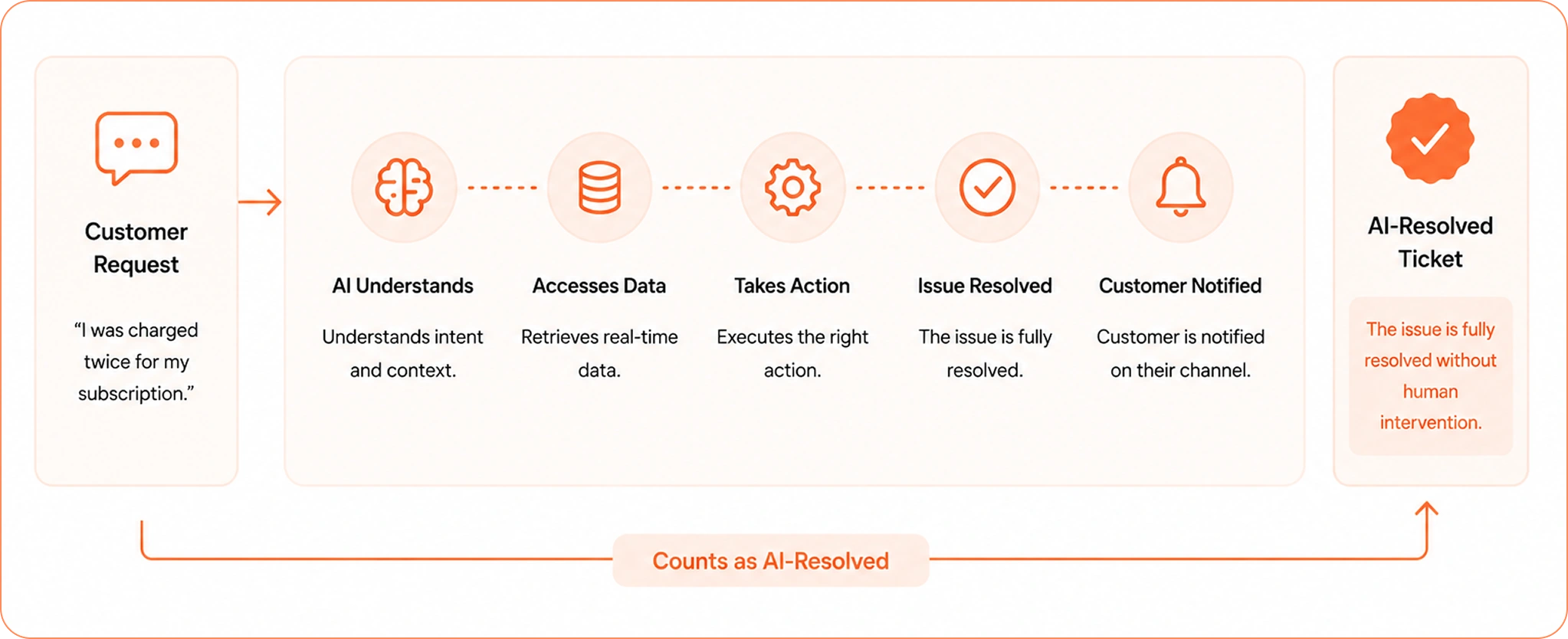
Automate customer service resolution workflow

For buyers, this distinction matters because a response can still leave work for an agent or customer. A resolution completes the requested outcome and records the result in the relevant systems.

When comparing customer service automation tools, ask vendors to demonstrate completed resolutions rather than response generation alone.

Can Customer Service Automation Software Complete Multi-step Requests?

Yes, if the platform can access the required systems, follow business rules, and execute approved actions.

The software should be able to understand the request, gather relevant customer context, determine the required workflow, perform the necessary actions, and confirm completion.

This is an important evaluation point for organizations looking beyond basic chatbot automation.

Can Customer Service Automation Software Create and Close Tickets?

Yes. Depending on the platform, it can create, classify, route, update, escalate, resolve, and close tickets.

During evaluation, ask what conditions are required for an AI-resolved ticket to be marked as closed and how the platform distinguishes AI resolution from human-assisted resolution.

Can Customer Service Automation Software Automate Refunds, Cancellations, and Exchanges?

Yes, when the required business systems and policies are connected.

The platform needs access to the relevant customer, transaction, order, or subscription information and must have permission to execute the required action.

Can Customer Service Automation Software Troubleshoot Technical Issues?

Yes. AI-powered customer service software can combine customer context, product information, knowledge, previous interactions, and system data to diagnose common issues.

For more complex problems, it can collect the required information and escalate the case with the investigation already documented.

How Much Automation Can I Actually Get?

Customer automation claims can vary widely depending on how they define automation and resolution.

These questions help you estimate achievable coverage and compare vendors using completed customer outcomes.

What is a Good Automated Resolution Rate?

There is no single benchmark that applies to every support organization.

Instead, establish your current resolution rate and evaluate vendors against your actual ticket categories.

However, Azilen promises up to 90% automated resolution rate, which is highest among all the available tools.

What Counts as an AI-Resolved Ticket?

An AI-resolved ticket should represent a completed customer outcome.

AI-resolved ticket workflow

If AI provides instructions and the customer performs the remaining work, it is automated guidance.

If AI completes the required workflow and the customer receives the finished outcome, it is resolution automation.

Use this distinction when comparing vendors and calculating ROI.

Does a Ticket Count as Resolved If a Human Completes the Final Action?

For autonomous resolution measurement, it should be classified separately.

You can track it as an AI-assisted or human-assisted resolution, but the cost of human intervention should remain visible in your automation metrics.

This gives your team a more accurate picture of how much work the software actually removes.

How Much L1 Support can Customer Service Automation Software Handle?

L1 support is often the best starting point because many requests are repetitive and follow defined processes.

The actual automation rate depends on your ticket mix, workflow complexity, and system connectivity.

Identify your highest-volume L1 workflows first and measure their resolution potential individually.

How Do I Compare Customer Service Automation Software?

A feature list alone makes software comparisons difficult. Evaluate each platform against the workflows, integrations, resolution targets, and operational outcomes that matter to your support organization.

What Should I Look for When Comparing Customer Service Automation Software?

Evaluate each platform across:

  • Resolution capability
  • Workflow execution
  • AI capabilities
  • Integrations
  • Omnichannel support
  • Human escalation
  • Security and governance
  • Analytics
  • Implementation
  • Pricing

Give greater weight to the capabilities that directly affect your support operation and business case.

Explore > > > How to Compare AI Vendors for Customer Support Automation?

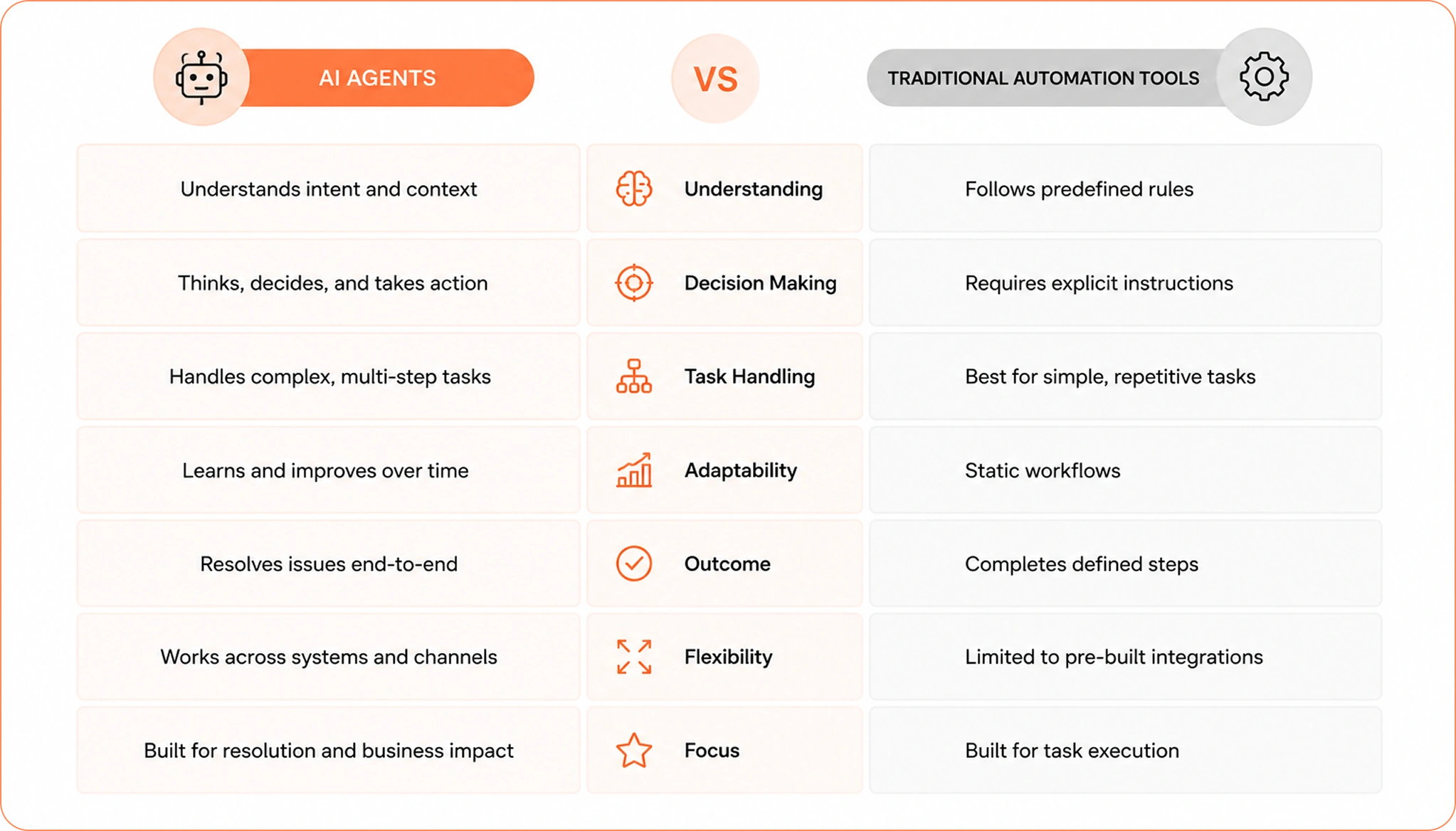
How Do I Compare AI Agents with Traditional Automation Tools?

Traditional automation works well for fixed processes with predictable inputs and outcomes.

AI agents are useful when customers express requests in different ways and the system needs to interpret intent, gather context, and select the appropriate workflow.

Your choice should depend on the complexity and variability of your support operation.

Here’s the difference.

AI agents vs traditional automation tools comparison

How Do I Compare Answer Automation with Resolution Automation?

Ask: “After the AI responds, who still has work to do?”

If an agent or customer still needs to complete the required action, the software has automated part of the interaction.

If AI completes the action and the customer’s requested outcome is finished, you have resolution automation.

For a support organization buying automation software, this distinction should influence both vendor selection and ROI calculations.

What Features Should I Pay For?

Prioritize capabilities that directly increase automation coverage and reduce manual support work.

These questions help you distinguish essential capabilities from features that add little value to your specific operation.

Does the Software Support AI-powered Ticket Resolution?

Look for evidence that the platform can complete customer requests, rather than simply generate responses.

Ask vendors to demonstrate your actual support workflows and show the actions performed before a case is marked resolved.

Does the Platform Have Shared Customer Memory?

For omnichannel support, customer context should remain available across interactions and channels.

Ask whether the platform can use previous conversations, account information, tickets, and relevant customer history when handling a new request.

Azeon supports shared customer context across chat, email, calls, and tickets.

Can the AI Reason Through Complex Customer Requests?

Ask vendors to demonstrate multi-step workflows rather than simple FAQ queries.

The platform should be able to interpret the request, gather relevant information, determine the appropriate workflow, execute approved actions, and escalate when the case requires human involvement.

This is where agentic AI in customer support can provide broader automation coverage.

Can We Control What Actions AI is Allowed to Perform?

Ask whether your team can define AI permissions, accessible systems, allowed actions, approval requirements, and escalation rules.

This gives your organization control over how autonomous the AI can become across different support workflows.

Will It Work With Our Existing Technology?

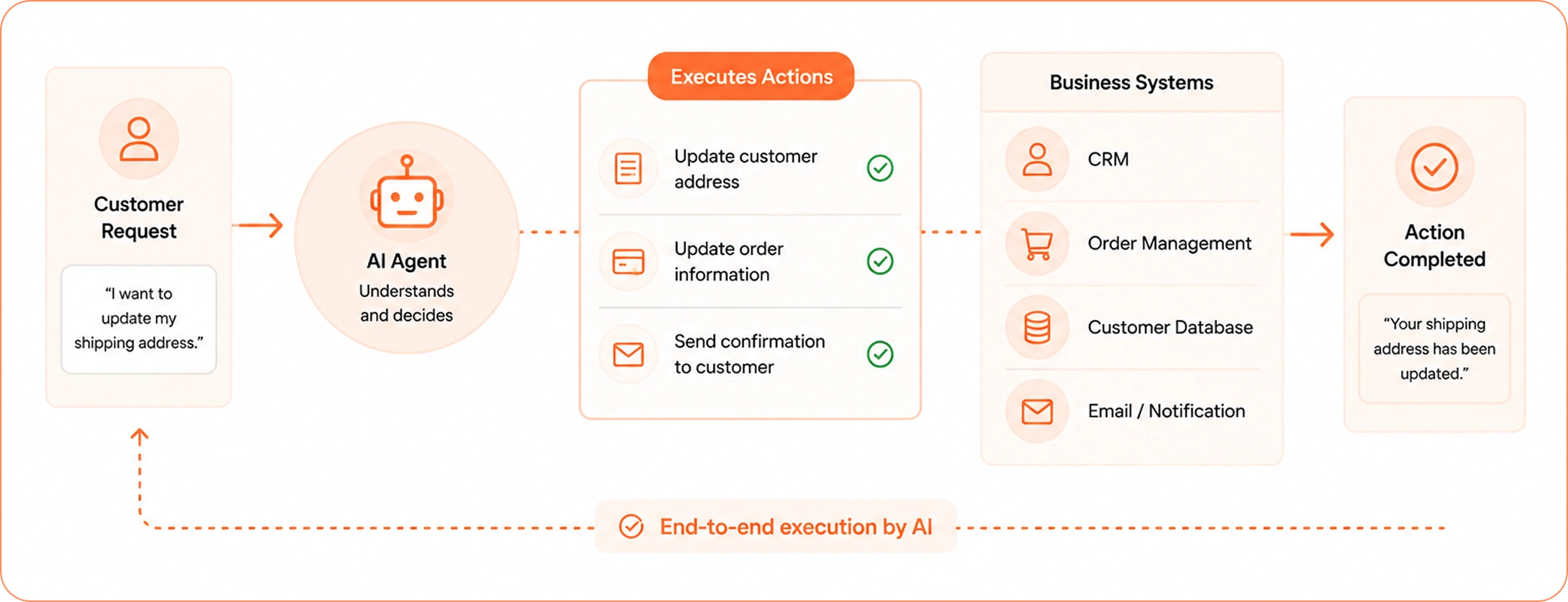
Integration determines how much of your existing support operation the software can actually automate.

Evaluate whether the platform can read customer context and execute actions across the systems your agents already use.

AI executing actions across business systems

Can Customer Service Automation Software Integrate with Our Existing Help Desk?

Integration should be a primary buying criterion.

The platform should work with your current help desk and connect to the other systems required to resolve customer requests.

Azeon follows an integration-first approach that allows organizations to add AI support automation while continuing to use their existing support infrastructure.

Can Customer Service Automation Software Work with Zendesk?

Yes, depending on the platform.

Look beyond basic ticket synchronization. Evaluate whether the integration supports customer context, ticket updates, workflow execution, escalation, and resolution tracking.

Can It Work with Salesforce and ServiceNow?

It can when the vendor provides appropriate integrations and permissions.

The important question is whether AI can both retrieve the information it needs and execute the actions required to resolve the request.

Azeon provides integrations for existing enterprise support and business systems.

Can It Integrate with Billing, Order Management, and Other Operational Systems?

Yes, and these integrations are essential for end-to-end automation.

Customer support often depends on information stored outside the help desk, including orders, payments, subscriptions, inventory, claims, and account records.

AI needs access to these systems when the workflow requires operational action.

How Much Engineering Work is Required for Integration?

Ask vendors for a clear implementation estimate covering APIs, authentication, data access, workflow configuration, testing, and ongoing maintenance.

Also establish which tasks your internal IT team owns and which the vendor handles.

What Will Customer Service Automation Software Cost?

Pricing can look very different across customer service automation platforms.

Compare the complete cost against expected ticket volume, automation coverage, and completed resolutions before choosing a pricing model.

How Much Does Customer Service Automation Software Cost?

Most AI customer support implementations range from $8,000 to $75,000+, while larger enterprise deployments can exceed that range as automation expands across multiple channels and business systems.

Most importantly, it depends on ticket volume, integrations, workflow complexity, and deployment model.

What Pricing Models Should I Expect?

Vendors use several pricing models, and each affects long-term costs differently.

  • Per-agent
  • Per-ticket
  • Per-conversation
  • Usage-based
  • Per-resolution
  • Per-action
  • Outcome-based
  • Custom enterprise pricing

For AI-powered customer service automation, compare pricing against the number of issues the platform can actually resolve, not just the number of conversations it handles.

Is Per-resolution Pricing Better than Per-seat Pricing?

Per-seat pricing charges for access, even if AI completes most of the work.

Per-resolution pricing aligns costs with completed customer outcomes, which makes it easier to measure ROI as automation increases.

This is the model Azeon follows. Instead of charging for seats, conversations, or tokens, pricing is tied to resolved issues and completed support outcomes.

What Factors Increase Implementation Costs?

Implementation costs usually increase as the support environment becomes more complex.

The biggest cost drivers include CRM integrations, workflow automation, omnichannel support, knowledge base quality, security requirements, and the number of business systems AI needs to access.

Organizations with multiple workflows and compliance requirements should expect a larger implementation effort.

How Long Does Implementation Take?

Most organizations can implement AI customer support within 4–12 weeks.

Smaller deployments usually move faster, while enterprise implementations involving CRM integrations, workflow orchestration, and omnichannel support require additional time for testing and governance.

What ROI Can I Expect?

Build the business case around measurable support outcomes rather than software usage alone. Calculate the effect on resolution cost, agent capacity, handling time, backlog, and customer experience.

How Do I Calculate ROI for Customer Service Automation Software?

A simple formula is:

ROI = (Support savings + productivity gains − automation cost) ÷ automation cost × 100

Use your own ticket volume, average handle time, cost per ticket, AI resolution rate, and implementation costs. This gives you a business case based on your support operation instead of industry averages.

How Much Can AI Reduce Average Handle Time?

Average Handle Time (AHT) is one of the fastest ways to measure ROI because labor is usually the largest support cost.

AI-powered customer support commonly reduces AHT by 20–25%, while some deployments report even larger improvements as automation expands.

If your current AHT is around 6 minutes, reducing even one minute per interaction can create meaningful capacity across thousands of monthly tickets.

How Much Can AI Improve First-contact Resolution?

First Contact Resolution (FCR) improves when AI can access customer context, business systems, and the workflows needed to complete requests.

Best-performing support organizations already achieve FCR rates above 74%, and AI-powered support platforms have reported noticeable improvements in both resolution speed and first-contact outcomes.

Explore > > > How to Improve FCR in Call Center With Agentic AI?

How Much Can AI Reduce Cost Per Resolution?

For organizations with high support volume, AI can significantly lower the cost of resolving routine requests.

Industry estimates place AI-handled support interactions at roughly $0.50–$1.05 per ticket, while human-handled tickets often fall between $8–$12, depending on staffing costs and support complexity.

For more insights, read our blog on: How to Reduce Customer Support Costs With AI?

Calculate Your 5-Year AI Support Savings

Estimate support savings, automation opportunities, and long-term ROI in under 60 seconds.

Calculate Your AI ROI →

Is the Software Secure Enough for Enterprise Use?

Customer service automation tool can access sensitive customer and business data, and some platforms can execute actions in connected systems.

Security, permissions, compliance, and auditability should therefore be part of the purchase decision.

How Secure is Customer Service Automation Software?

Evaluate data protection, access controls, authentication, authorization, encryption, AI permissions, auditability, and data retention.

Your security team should review the vendor’s architecture and documentation before procurement.

Can We Control Which Systems AI Can Access?

Enterprise platforms should allow organizations to control AI access based on the workflow.

Read access may be sufficient for information retrieval, while write access should be restricted to approved actions.

Ask how permissions are configured and monitored.

Does the Software Provide Audit Logs?

Audit logs should show what the AI accessed, what decisions it made, what actions it executed, and what happened afterward.

This is particularly important when AI can modify customer or business records.

Azeon emphasizes controlled execution and auditability as part of its enterprise AI support approach.

Does Customer Service Automation Software Support Gdpr?

European buyers should evaluate data processing, storage, retention, deletion, access rights, subprocessors, and security controls.

Ask the vendor for its current GDPR documentation and involve your privacy and legal teams during procurement.

What Security Certifications Should We Ask for?

The right requirements depend on your industry and customer data.

Common areas include SOC 2, ISO 27001, GDPR controls, encryption, role-based access, and audit logging.

Which Customer Service Automation Software Should I Buy?

The best platform depends on the workflows you need to automate, the systems you already use, and the outcomes you expect.

This comparison gives you a starting shortlist and the criteria to evaluate each vendor consistently.

What are the Best Customer Service Automation Software Platforms in 2026?

The right platform depends on your support model, existing technology, automation goals, and required level of AI autonomy.

Platforms buyers may evaluate include:

Platform Best suited for
Azeon End-to-end agentic customer support and resolution automation
Zendesk AI Organizations using Zendesk
Salesforce Agentforce Salesforce-centric enterprises
Intercom Fin Digital and SaaS customer support
Sierra Autonomous customer service
Decagon AI customer support automation
Ada Enterprise AI support
Forethought AI-powered support workflows
Freshworks Freshworks environments
Kustomer Customer-centric support operations

How Should I Compare These Platforms?

Focus on automation, resolution capability and workflow execution should carry significant weight.

Use the same criteria for every vendor:

Criteria What to evaluate
Resolution Can it complete the customer outcome?
Workflow execution Can it perform required actions?
AI capabilities Can it understand intent and context?
Integrations Can it work across your systems?
Memory Can it retain customer context?
Human handoff Can complex cases move to agents?
Governance Can you control AI actions?
Analytics Can you measure ROI and resolution?
Implementation How difficult is deployment?
Pricing What are you paying for?

How Do I Know Which Customer Service Automation Software Will Deliver the Most Value?

Use one final test:

Can the platform take a meaningful percentage of customer requests from query to completed resolution?

Evaluate the complete workflow:

Customer query → Intent → Context → Reasoning → System access → Action → Confirmation → Resolution

This is the difference between automating responses and automating customer support outcomes.

A platform that generates answers can reduce some agent workload.

A platform that can understand requests, access business systems, execute approved workflows, and complete customer outcomes can automate a larger share of the support operation.

Why Azeon is the Best Customer Support Automation Software?

If your goal is to reduce support costs without replacing your existing stack, Azeon is built for that.

Azeon is a resolution-first agentic AI customer support platform. It understands customer intent, accesses business systems, executes approved workflows, and resolves support requests from start to finish.

What You Get with Azeon

  • End-to-end resolution automation – Moves from customer query to completed resolution.
  • No migration required – Works with your existing CRM, help desk, and business systems.
  • Shared customer memory – Maintains context across chat, email, voice, and tickets.
  • Deterministic execution – Business rules control actions for consistent, auditable outcomes.
  • Human-in-the-loop governance – Escalates sensitive cases with full customer context.
  • Omnichannel support – Delivers connected experiences across every support channel.
  • Enterprise-ready security – Built with GDPR, SOC 2, HIPAA, and audit-ready controls in mind.

One of the biggest differentiator of Azeon is, instead of charging for agents, seats, tokens, or API usage, Azeon follows a Result-as-a-Service pricing model where you pay for successfully resolved customer issues.

That means your costs scale with business outcomes rather than software usage.

AI-resolved queries start from $0.50 per resolution, with no per-seat or LLM usage costs in the outcome-based model.

Every support operation has different workflows, ticket volumes, and system integrations.

A personalized walkthrough can help you identify which requests can move from manual handling to autonomous resolution and estimate the potential savings before you commit.

Experience How Azeon Resolve a Support Query

Explore how customer intent, business context, and support workflows come together in one automated resolution.

Schedule a Demo →

Tarak Joshi leads growth strategy and market expansion for agentic AI-powered customer support solutions. With 20+ years of experience in business strategy, IT consulting, and operational excellence, he focuses on helping enterprises improve support outcomes, reduce operational costs, and adopt AI with measurable business impact. His expertise spans customer experience transformation, AI-led service operations, and aligning technology investments with business goals.

Tarak Joshi
VP - Sales

Questions about Azeon?

Connect with our team to explore use cases, workflows, and deployment possibilities.