
Skip to content

How to Improve FCR in Call Center With Agentic AI? A Complete Guide

How to Improve FCR in Call Center With Agentic AI? A Complete Guide

Salesforce’s 2026 State of Service report found that:

  • Customer service organizations using AI agents increased from 39% in 2025 to 66% in 2026.
  • Among organizations that have deployed AI agents, 70% reported measurable value within 60 days.
  • Customer satisfaction ranked as the most improved KPI, alongside human agent productivity, AHT, FCR, and customer retention.

The research covered 3,075 service professionals across North America, Latin America, Asia-Pacific, and Europe.

For call centers, this makes FCR a key area where Agentic AI can create an impact.

Agentic AI can understand a customer request, retrieve the right context, determine the resolution path, execute approved actions across connected systems, and verify the outcome.

Instead of helping an agent answer faster, it can help the call center complete more resolutions during the first interaction.

So, how exactly can Agentic AI improve FCR in a call center? Let’s find out.
Where Agentic AI Fits in a Call Center Workflows?

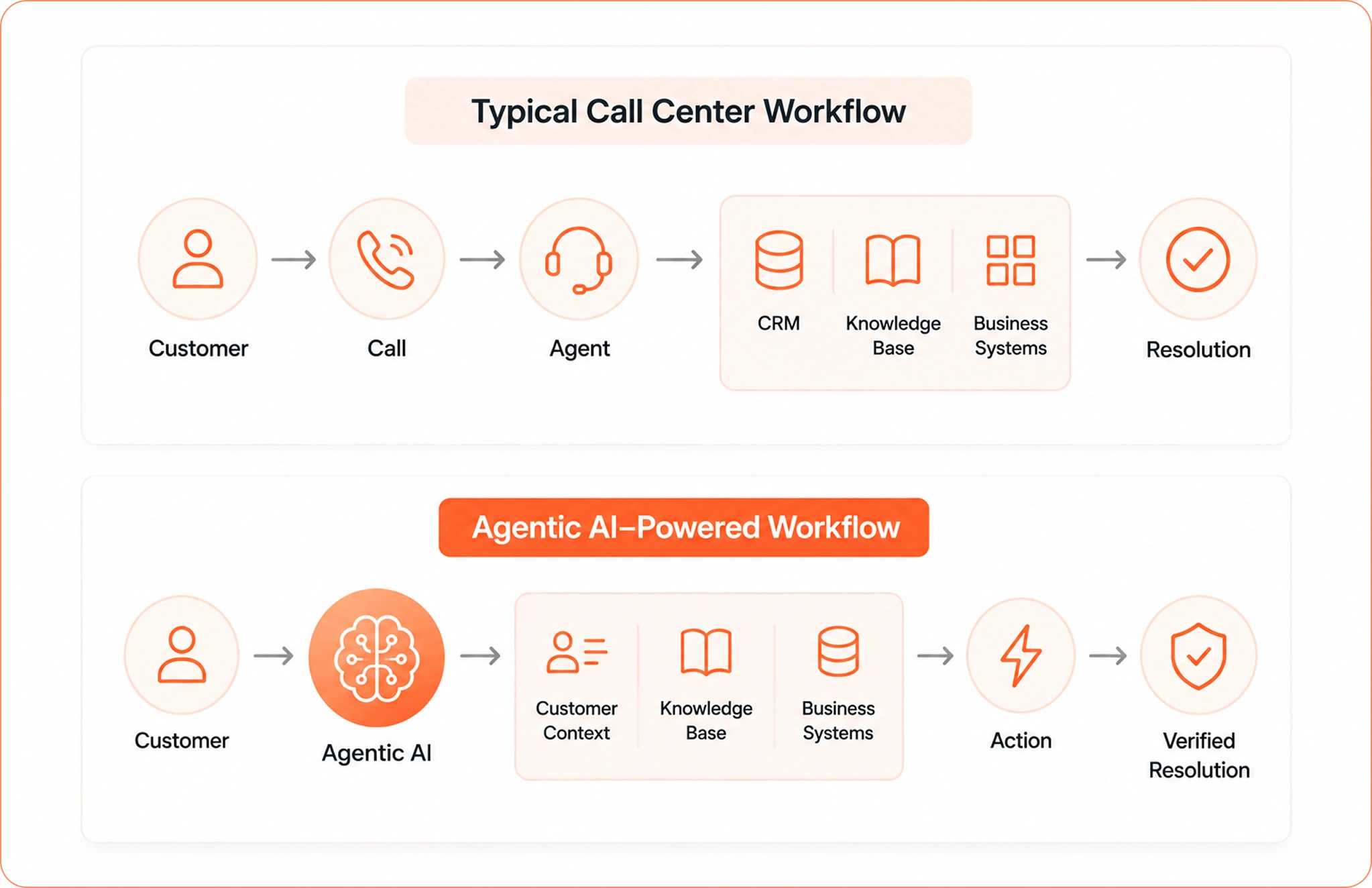
Agentic AI works across the support workflow rather than sitting only in the customer conversation. It connects the customer request with the context, systems, decisions, and actions required to resolve it.

A typical call center workflow looks like:

Agentic AI call center workflow for improving FCR

Here is what that means for a call center.

1. Understand the request: Agentic AI identifies the customer’s intent, urgency, sentiment, and the actual issue behind the request.

2. Retrieve context: It pulls relevant information from the CRM, ticket history, customer profile, orders, payments, and previous interactions.

3. Reason through the issue: It evaluates the available information against knowledge, policies, and business rules to determine the appropriate resolution path.

4. Execute the workflow: Through integrations with existing business systems, the AI can perform approved actions.

5. Bring in a human when required: For cases requiring approval, judgment, or specialized handling, the AI can escalate with the conversation history and relevant context already attached.

6. Verify the outcome: After an action is completed, the AI can check the result and confirm that the requested resolution has actually taken place.

For call center leaders, the practical question becomes:

Which parts of your current resolution workflow can Agentic AI understand, execute, and verify during the first interaction?

How to Improve FCR in a Call Center with Agentic AI?

The best starting point is to look at the customer requests that generate the highest number of repeat calls, transfers, and follow-ups.

These are usually the workflows where customers need information from multiple systems or require an action after the agent identifies the issue.

Agentic AI can take over parts of these workflows and, for suitable cases, handle the complete resolution.

Resolve Information-Heavy Calls Faster

Many calls require agents to gather information before they can provide an answer. Checking an account, reviewing previous interactions, locating an order, or verifying a transaction can take the agent through several screens and systems.

Agentic AI can retrieve this information and bring the relevant context into the interaction.

FCR benefit: Agents spend less time gathering information and can address the customer’s actual issue during the first interaction.

Reduce Transfers with Intelligent Resolution Routing

Transfers often happen when the first agent has insufficient information, access, or authority to complete the request.

Agentic AI can evaluate the customer’s intent, account context, and required action to determine which workflow or support resource should handle the case.

If a human specialist is required, the AI can pass the conversation with the relevant context and actions already completed.

FCR benefit: Fewer unnecessary transfers and less repetition for the customer.

Automate High-Volume Resolution Workflows

Start with support requests that follow consistent business rules and require repeatable actions.

Examples include:

  • Refund and cancellation requests
  • Order and delivery queries
  • Account updates
  • Payment-related requests
  • Subscription changes

Agentic AI can retrieve the required information, apply the relevant rules, execute the permitted action through connected systems, and update the support record.

FCR benefit: More high-volume requests can reach a completed resolution within the first contact.

Learn more about: How AI Automation Reduces Repetitive Help Desk Tickets

Handle Multi-Step Requests Across Systems

Some customer issues require several actions before the case can close.

A subscription cancellation, for example, may require account verification, policy validation, cancellation, refund calculation, payment processing, and CRM updates.

Agentic AI can orchestrate these steps across connected systems while maintaining the same customer context throughout the workflow.

FCR benefit: Customers can complete complex requests through a single interaction instead of returning for each pending step.

Make Escalations Count Toward Resolution

Escalation can still be part of a successful first-contact resolution process when the right team receives the case with complete context.

Agentic AI can provide the receiving agent with the conversation summary, customer history, issue details, actions already attempted, and relevant system information.

The next agent can continue from that point instead of restarting the diagnosis.

FCR benefit: Faster specialist handling and fewer repeat explanations.

Verify the Resolution Before Closing

An action being initiated does not always mean the customer issue has been resolved.

Agentic AI can check whether the refund was processed, account was updated, order action completed, or ticket workflow succeeded before confirming the outcome.

This creates a stronger connection between AI automation and actual FCR improvement.

FCR benefit: Fewer repeat contacts caused by incomplete resolutions.

How to Measure Whether Agentic AI is Improving FCR?

FCR should sit alongside the operational metrics that explain why it moves.

Track:

  • FCR rate: Percentage of interactions resolved during the first contact.
  • Repeat contact rate: How often customers contact support again for the same issue.
  • Transfer rate: How frequently calls move between agents or teams.
  • Escalation rate: How often AI or frontline agents require additional support.
  • AI resolution rate: Percentage of eligible cases resolved through AI.
  • Task completion rate: Percentage of requested actions successfully completed.
  • Cost per resolution: Support cost associated with each completed customer outcome.

This gives call center leaders a much clearer view of Agentic AI performance.

How to Implement Agentic AI for Better FCR in Call Center?

Implementing Agentic AI to improve FCR in call center starts with identifying the right support workflows and connecting the systems needed to resolve them.

Follow these steps to build an Agentic AI setup.

Step 1: Identify High-Repeat Contact Reasons

Analyze your call drivers, repeat contact rate, transfer rate, and escalation data. Identify the customer issues that generate the most repeat calls and follow-ups.

Step 2: Map the Resolution Workflow

For each high-volume issue, map everything required to resolve it—from customer intent and required information to decisions, system actions, and final resolution.

Step 3: Connect Your Existing Support Systems

Identify the CRM, contact center platform, help desk, billing, payment, order management, knowledge base, and other systems involved in each workflow.

Connect these systems so the AI can access the required context and perform approved actions.

Step 4: Configure AI Reasoning and Workflow Execution

Define the knowledge, business rules, workflows, and actions the AI can use. Let the AI determine the appropriate resolution path and execute permitted actions across connected systems.

Step 5: Define Human Escalation and Controls

Set clear boundaries for AI autonomy. Define which cases require human approval, which actions need supervisor authorization, and when AI should escalate to a specialist.

Preserve the complete customer context during every escalation.

Step 6: Measure Resolution Outcomes

Track FCR, repeat contact rate, transfer rate, escalation rate, AI resolution rate, task completion rate, CSAT, and cost per resolution.

Use these metrics to identify where Agentic AI is improving the resolution workflow and where additional automation can be introduced.

What to Look for in an Agentic AI Platform for Your Call Center?

The quality of an Agentic AI implementation to improve FCR in call center depends heavily on what the platform can do beyond generating responses.

For that, evaluate the platform around its ability to complete support workflows.

Existing-System Integrations

The platform should connect with the CRM, contact center platform, help desk, billing, order management, payment, and other systems your agents already use.

Customer Memory

It should retain relevant customer context across interactions so agents and AI can work from the same history.

Workflow Execution

Look for the ability to perform approved actions across connected systems, rather than simply recommend what an agent should do.

Business-Rule Controls

AI should follow your policies, eligibility criteria, approval thresholds, and operational rules when making decisions and taking actions.

Human-in-the-Loop

Teams should be able to define when AI can act independently and when a human agent or supervisor needs to approve an action.

Context-Aware Escalation

When a case moves to a human agent, the conversation history, customer context, actions taken, and reason for escalation should move with it.

Resolution Verification

The platform should be able to confirm that an action completed successfully before treating the interaction as resolved.

How Azeon Helps Call Centers Improve FCR With Agentic AI?

Azeon is an Agentic AI platform built to help customer support teams move from AI-assisted conversations to AI-driven resolutions.

Azeon can understand the customer’s request, retrieve relevant customer and conversation context, determine the right resolution path, execute approved actions across connected systems, and verify the outcome.

What makes Azeon special is that it works alongside your existing CRM, help desk, and business applications, which allows you to introduce Agentic AI without rebuilding entire support operation.

Key Azeon capabilities:

  • Omnichannel support across chat, email, calls, and tickets
  • Shared customer context and history across interactions
  • Smart Knowledge Engine for instant, relevant answers
  • Human-in-the-loop controls for approvals and overrides
  • Live monitoring and control for support operations
  • Analytics and insights for resolution and AI performance
  • Security and compliance with RBAC, encryption, audit logs, GDPR, SOC 2, and HIPAA

Azeon also changes the economics of AI-powered customer support with pay-per-resolution pricing.

Instead of paying for AI seats that may sit idle or measuring value through usage alone, you pay based on completed resolutions. This connects your AI investment directly to the customer outcomes your support operation is trying to improve.

Talk to the Azeon team to identify your highest-impact FCR workflows and see how Agentic AI can help resolve more customer issues during the first interaction.

See How Azeon can Help Your Call Center Improve FCR

Explore your highest-impact workflows, see where it can take action, and discuss the right path for your support operation.

Schedule a Demo →

FAQs

How does Agentic AI improve first call resolution?

Agentic AI improves FCR by handling the steps required to complete a customer request during the first interaction. It can understand intent, retrieve customer context, reason through business rules, execute workflows across connected systems, and verify the outcome. This helps reduce transfers, follow-ups, and repeat contacts.

Can Agentic AI resolve customer issues without a human agent?

Yes, Agentic AI can autonomously resolve customer issues when the workflow, business rules, and required system actions are within its defined permissions. For cases requiring judgment, approval, or specialist handling, it can escalate to a human agent with the relevant customer and conversation context.

What call center tasks can Agentic AI automate?

Agentic AI can automate repetitive support workflows such as account updates, order checks, payment inquiries, refunds, cancellations, ticket updates, and other rule-based requests. The exact tasks depend on the systems connected to the AI and the actions the business permits it to execute.

How does Agentic AI reduce repeat calls in a call center?

Agentic AI reduces repeat calls by completing more of the resolution during the first interaction. It can retrieve customer information, perform required system actions, coordinate multi-step workflows, and verify completion before closing the case. This reduces follow-ups caused by incomplete resolutions.

Can Agentic AI work with existing call center systems?

Yes. Agentic AI platforms can connect with existing CRM, contact center, help desk, billing, payment, order management, and knowledge systems through integrations. This allows AI to use existing customer data and execute approved workflows within the current support environment.

Tarak Joshi leads growth strategy and market expansion for agentic AI-powered customer support solutions. With 20+ years of experience in business strategy, IT consulting, and operational excellence, he focuses on helping enterprises improve support outcomes, reduce operational costs, and adopt AI with measurable business impact. His expertise spans customer experience transformation, AI-led service operations, and aligning technology investments with business goals.

Tarak Joshi
VP - Sales

Questions about Azeon?

Connect with our team to explore use cases, workflows, and deployment possibilities.